The Birth of Java

Java was created by James Gosling along with Mike Sheridan and Patrick Naughton at Sun Microsystems (now owned by Oracle Corporation) in 1995. The language was originally called "Oak" after an oak tree that stood outside James Gosling's office. When the team discovered that Oak was already a trademark of Oak Technologies, the name was changed to Java, inspired by Java coffee that originated from the Indonesian island of Java.

Why Was Java Created?

In the early 1990s, software developers faced several major challenges that made building cross platform applications extremely difficult. The motivation behind creating Java was to solve these fundamental problems that plagued the industry at the time.

  • Platform dependency meant that code written for Windows would not work on Mac or Unix without significant rewriting, forcing companies to maintain separate codebases for each operating system
  • Memory management issues in languages like C and C++ required developers to manually allocate and deallocate memory, which frequently led to memory leaks and segmentation faults that were extremely hard to debug
  • Pointer complexity in C and C++ caused crashes, buffer overflows, and critical security vulnerabilities that hackers could exploit to gain unauthorized access to systems
  • No built in internet support meant that existing programming languages were not designed with networking and distributed computing in mind, making it cumbersome to build web connected applications
  • Lack of portability forced development teams to recompile and often rewrite significant portions of their applications when targeting different processor architectures
The Green Project and Original Goal

Java was initially developed as part of the "Green Project" at Sun Microsystems. The project was started in June 1991 by James Gosling, Mike Sheridan, and Patrick Naughton. The original goal was to create a programming language for interactive television and embedded systems like set top boxes and other consumer electronics devices.

The team built a device called "*7" (Star Seven), which was a handheld home entertainment controller with an animated touchscreen user interface. This device demonstrated the potential of the new language. However, the digital cable television industry considered the technology too advanced for their needs at that time.

When the World Wide Web exploded in popularity during 1993 and 1994, Sun Microsystems recognized that Java's platform independent nature made it perfect for internet programming. They pivoted the language toward web development, and the rest is history. The first public implementation was Java 1.0 in 1996, and it delivered on the promise of "Write Once, Run Anywhere" with free runtimes on popular platforms.

Key Principles: Write Once, Run Anywhere (WORA)

"Write Once, Run Anywhere" (WORA)

This became Java's revolutionary promise. Code compiled on one platform could run on any other platform without modification. This was achieved through the Java Virtual Machine (JVM), which acts as an abstraction layer between the compiled Java bytecode and the underlying hardware. Each operating system has its own JVM implementation, but all of them understand the same bytecode format.

Your First Java Program

To understand how Java works from the very beginning, here is the classic "Hello, World!" program that every Java developer starts with. This simple example demonstrates key Java concepts including class definition, the main method entry point, and console output.

// HelloWorld.java public class HelloWorld { public static void main(String[] args) { System.out.println("Hello, World!"); } } // Compile: javac HelloWorld.java // Run: java HelloWorld // Output: Hello, World!

In this example, public class HelloWorld defines a public class whose name must match the file name. The public static void main(String[] args) method is the entry point that the JVM calls when you run the program. System.out.println() prints a line of text to the standard output console.

Java's Evolution Timeline

Java has gone through numerous major releases since its inception, each one adding powerful features that have kept the language relevant and competitive. The following table summarizes the most important versions and their landmark features.

Version Year Major Features
Java 1.0 1996 First stable version with AWT, Applets, and core libraries
Java 1.1 1997 Inner classes, JavaBeans, JDBC, RMI
Java 1.2 1998 Collections Framework, Swing GUI, JIT compiler
Java 1.4 2002 Assertions, NIO, Regular expressions, XML parsing
Java 5 2004 Generics, Annotations, Enums, Autoboxing, Varargs, Enhanced for loop
Java 7 2011 Try with resources, Diamond operator, Multi catch, NIO.2
Java 8 2014 Lambda expressions, Stream API, Optional, Default methods, Date/Time API
Java 9 2017 Module system (Project Jigsaw), JShell, Private interface methods
Java 11 2018 LTS version, HTTP Client, Local var in lambdas, String methods
Java 14 2020 Switch expressions, Records (preview), Pattern matching instanceof (preview)
Java 17 2021 LTS version, Sealed classes, Pattern matching for switch (preview), Records finalized
Java 21 2023 LTS version, Virtual Threads (Project Loom), Record patterns, Pattern matching for switch finalized, Sequenced Collections
Java 8 Features: A Turning Point

Java 8 was arguably the most transformative release in Java's history. It introduced functional programming paradigms that fundamentally changed how Java developers write code. Here are some quick examples of the most important Java 8 additions.

// Lambda Expression (Java 8) List<String> names = Arrays.asList("Alice", "Bob", "Charlie"); names.forEach(name -> System.out.println(name)); // Stream API (Java 8) List<Integer> numbers = Arrays.asList(1, 2, 3, 4, 5, 6, 7, 8, 9, 10); int sumOfEvens = numbers.stream() .filter(n -> n % 2 == 0) .mapToInt(Integer::intValue) .sum(); System.out.println("Sum of evens: " + sumOfEvens); // 30 // Optional (Java 8) Optional<String> optional = Optional.ofNullable(getUserName()); String name = optional.orElse("Anonymous"); // Method References (Java 8) names.forEach(System.out::println); // Default Methods in Interfaces (Java 8) interface Greeting { default void greet() { System.out.println("Hello!"); } }
Modern Java Features (Java 14 to 21)
// Records (Java 16+) - Concise immutable data classes record Point(int x, int y) {} Point p = new Point(10, 20); System.out.println(p.x()); // 10 // Sealed Classes (Java 17+) - Restricted class hierarchies sealed interface Shape permits Circle, Rectangle {} record Circle(double radius) implements Shape {} record Rectangle(double width, double height) implements Shape {} // Pattern Matching for instanceof (Java 16+) if (obj instanceof String s) { System.out.println(s.toUpperCase()); } // Text Blocks (Java 15+) String json = """ { "name": "Java", "version": 21 } """; // Switch Expressions (Java 14+) String day = "MONDAY"; String type = switch (day) { case "MONDAY", "TUESDAY", "WEDNESDAY", "THURSDAY", "FRIDAY" -> "Weekday"; case "SATURDAY", "SUNDAY" -> "Weekend"; default -> "Unknown"; }; // Virtual Threads (Java 21+) - Lightweight concurrency Thread.startVirtualThread(() -> { System.out.println("Running in a virtual thread!"); });
Why Java Became Popular

Java's rise to becoming one of the most widely used programming languages in the world can be attributed to several key strengths that set it apart from competing languages during its early years and continue to make it relevant today.

  • Platform Independence through the JVM allows true WORA capability, meaning the same compiled bytecode runs identically on Windows, macOS, Linux, and any other platform with a JVM implementation
  • Object Oriented Design promotes clean, modular, and reusable code organization through encapsulation, inheritance, polymorphism, and abstraction
  • Automatic Memory Management via garbage collection eliminates the burden of manual memory allocation and deallocation, preventing entire categories of bugs like memory leaks and dangling pointers
  • Rich Standard Library provides an extensive API covering data structures, networking, file I/O, database connectivity, XML processing, and hundreds of other utilities out of the box
  • Built in Security features including bytecode verification, the security manager, class loaders, and cryptography APIs make Java a trusted choice for enterprise and financial applications
  • Native Multithreading Support allows developers to write concurrent programs that take full advantage of modern multi core processors
  • Massive Developer Community with millions of developers worldwide, extensive documentation, thousands of open source libraries, and frameworks for virtually every use case
  • Backward Compatibility ensures that code written decades ago still compiles and runs on modern JVM versions, protecting investments in existing codebases
Java in the Real World Today

Java remains one of the most popular programming languages in the world, consistently ranking in the top three on the TIOBE Index and Stack Overflow surveys. It powers critical systems across virtually every industry.

  • Enterprise Applications in banking, insurance, and finance where reliability and security are paramount. Most major banks run their core systems on Java
  • Android Mobile Applications as Android's official development language (alongside Kotlin), powering billions of devices worldwide
  • Big Data Technologies including Apache Hadoop, Apache Spark, Apache Kafka, Apache Flink, and Elasticsearch are all written primarily in Java
  • Cloud Native Applications running on AWS, Azure, and Google Cloud Platform with frameworks like Spring Boot, Quarkus, and Micronaut
  • Microservices Architecture with Spring Cloud, Netflix OSS, and other Java based frameworks powering distributed systems at scale
  • Internet of Things (IoT) devices and embedded systems leverage Java ME and the compact footprint of modern JVMs
  • Scientific and Research Applications in fields like bioinformatics, physics simulation, and data analysis
  • Gaming with Minecraft being one of the most popular games ever made, written entirely in Java

Interview Tip: When asked "Why Java?", focus on platform independence, automatic memory management, robust ecosystem, and strong typing. Mention specific use cases relevant to the company you are interviewing with.

Understanding JDK, JRE, and JVM

Understanding the relationship between JDK, JRE, and JVM is fundamental to every Java developer and is one of the most frequently asked questions in Java interviews. These three components form a layered architecture where each layer builds upon the one below it.

The Java Ecosystem Hierarchy
JDK โŠƒ JRE โŠƒ JVM JDK (Java Development Kit) โ”œโ”€โ”€ Development Tools (javac, jdb, javadoc, jar, jlink, jpackage) โ””โ”€โ”€ JRE (Java Runtime Environment) โ”œโ”€โ”€ Java Class Libraries (java.lang, java.util, java.io, java.net, etc.) โ”œโ”€โ”€ Deployment Technologies โ””โ”€โ”€ JVM (Java Virtual Machine) โ”œโ”€โ”€ Class Loader Subsystem โ”œโ”€โ”€ Runtime Data Areas (Heap, Stack, Method Area, PC Registers) โ”œโ”€โ”€ Execution Engine (Interpreter + JIT Compiler) โ””โ”€โ”€ Native Method Interface (JNI)
JVM (Java Virtual Machine)

The JVM is an abstract computing machine that provides the runtime environment in which Java bytecode is executed. It is the cornerstone of Java's platform independence. The JVM itself is platform dependent (there are different JVM implementations for Windows, macOS, and Linux), but the bytecode it executes is platform independent. This is what makes the "Write Once, Run Anywhere" promise possible.

When you run a Java program, the JVM performs several critical tasks. It loads the compiled bytecode (.class files) into memory, verifies that the bytecode is valid and does not violate security constraints, and then executes the bytecode either through interpretation or just in time compilation to native machine code.

Core responsibilities of the JVM:

  • Loading bytecode from .class files into memory through the Class Loader subsystem
  • Verifying bytecode to ensure it conforms to the JVM specification and does not perform illegal operations
  • Executing bytecode through the Execution Engine which combines an interpreter with a JIT compiler
  • Providing the runtime environment including memory management, thread scheduling, and security enforcement
  • Managing memory by dividing it into distinct areas (heap, stack, method area) and performing automatic garbage collection
  • Handling exceptions and propagating them through the call stack

Platform Independence Explained: The JVM is platform dependent, meaning you need a different JVM for Windows, Mac, and Linux. However, Java bytecode is platform independent. This means the same .class file can run on any operating system as long as a compatible JVM is installed. This separation of concerns is the key insight behind Java's portability.

JVM Architecture in Detail

The JVM architecture can be divided into three major subsystems. The Class Loader Subsystem handles loading, linking, and initializing classes. The Runtime Data Areas provide the memory structures needed during execution. The Execution Engine performs the actual bytecode execution.

JVM Architecture โ”‚ โ”œโ”€โ”€ 1. Class Loader Subsystem โ”‚ โ”œโ”€โ”€ Loading โ”‚ โ”‚ โ”œโ”€โ”€ Bootstrap ClassLoader (loads rt.jar, core Java classes) โ”‚ โ”‚ โ”œโ”€โ”€ Extension ClassLoader (loads jre/lib/ext classes) โ”‚ โ”‚ โ””โ”€โ”€ Application ClassLoader (loads classpath classes) โ”‚ โ”œโ”€โ”€ Linking โ”‚ โ”‚ โ”œโ”€โ”€ Verification (bytecode verification) โ”‚ โ”‚ โ”œโ”€โ”€ Preparation (allocate memory for static variables) โ”‚ โ”‚ โ””โ”€โ”€ Resolution (symbolic references โ†’ direct references) โ”‚ โ””โ”€โ”€ Initialization โ”‚ โ””โ”€โ”€ Execute static initializers and static blocks โ”‚ โ”œโ”€โ”€ 2. Runtime Data Areas โ”‚ โ”œโ”€โ”€ Method Area (class metadata, static variables, constant pool) [shared] โ”‚ โ”œโ”€โ”€ Heap (all objects and instance variables) [shared] โ”‚ โ”œโ”€โ”€ Java Stack (one per thread: frames with local vars, operand stack) โ”‚ โ”œโ”€โ”€ PC Register (one per thread: address of current instruction) โ”‚ โ””โ”€โ”€ Native Method Stack (one per thread: for native method calls) โ”‚ โ””โ”€โ”€ 3. Execution Engine โ”œโ”€โ”€ Interpreter (reads and executes bytecode line by line) โ”œโ”€โ”€ JIT Compiler (compiles hot bytecode to native machine code) โ”‚ โ”œโ”€โ”€ Intermediate Code Generator โ”‚ โ”œโ”€โ”€ Code Optimizer โ”‚ โ””โ”€โ”€ Target Code Generator โ”œโ”€โ”€ Profiler (identifies hotspot methods) โ””โ”€โ”€ Garbage Collector (reclaims unreferenced heap memory)
Class Loader Delegation Model

Java uses a parent delegation model for class loading. When a class needs to be loaded, the request is first delegated to the parent class loader before the child attempts to load it. This prevents core Java classes from being overridden by user defined classes with the same name.

// Demonstrating the Class Loader hierarchy public class ClassLoaderDemo { public static void main(String[] args) { // Application ClassLoader ClassLoader appLoader = ClassLoaderDemo.class.getClassLoader(); System.out.println("App ClassLoader: " + appLoader); // Output: sun.misc.Launcher$AppClassLoader // Extension ClassLoader (parent of Application) ClassLoader extLoader = appLoader.getParent(); System.out.println("Ext ClassLoader: " + extLoader); // Output: sun.misc.Launcher$ExtClassLoader // Bootstrap ClassLoader (parent of Extension, written in native code) ClassLoader bootstrapLoader = extLoader.getParent(); System.out.println("Bootstrap ClassLoader: " + bootstrapLoader); // Output: null (because it's implemented in native code) // Core classes loaded by Bootstrap System.out.println("String loader: " + String.class.getClassLoader()); // Output: null (loaded by Bootstrap) } }
JRE (Java Runtime Environment)

The JRE provides the complete environment needed to run Java applications. It bundles the JVM together with all the standard class libraries and supporting files that Java programs need at runtime. If you only need to run Java programs (not develop them), the JRE is all you need.

Components included in the JRE:

  • JVM as the core execution engine
  • Java Class Libraries including java.lang (fundamental classes), java.util (data structures and utilities), java.io (input/output), java.net (networking), java.sql (database access), and hundreds more
  • Supporting files including property settings, resource files, fonts, and security configurations
  • Deployment technologies including Java Web Start and Java Plugin (deprecated in later versions)

Important: The JRE does NOT include development tools like the compiler (javac), debugger (jdb), or documentation generator (javadoc). It is only for running Java programs, not developing them. Starting with Java 11, Oracle no longer ships a standalone JRE; you install the full JDK instead.

JDK (Java Development Kit)

The JDK is the full featured software development kit required for developing Java applications. It is a superset of the JRE, containing everything the JRE has plus additional tools needed for development, compilation, debugging, and documentation.

Development tools included in the JDK:

  • javac is the Java compiler that converts .java source files into .class bytecode files
  • java is the application launcher that starts the JVM and runs your program
  • jdb is the Java debugger for stepping through code and inspecting variables
  • javadoc generates HTML documentation from source code comments
  • jar packages compiled classes and resources into JAR (Java Archive) files
  • javap is the class file disassembler that shows bytecode instructions
  • jconsole and jvisualvm are monitoring and profiling tools
  • jshell (Java 9+) is the interactive REPL for quick experimentation
  • jlink (Java 9+) creates custom runtime images with only the modules you need
  • jpackage (Java 14+) creates platform specific installers for your application
JDK vs JRE vs JVM: Comparison Table
Feature JVM JRE JDK
Purpose Execute bytecode Run Java applications Develop and run Java applications
Platform Platform dependent Platform dependent Platform dependent
Contains Execution engine, memory areas JVM + class libraries + configs JRE + compiler + dev tools
Compiler (javac) No No Yes
Debugger (jdb) No No Yes
Target Users Internal component End users running Java apps Java developers
Can compile .java? No No Yes
Can run .class? Yes Yes Yes
How Java Code Executes: Step by Step

Understanding the complete lifecycle of Java code execution from writing source code to seeing output on the screen is essential. Here is the detailed flow.

Step 1: Write Source Code Developer writes MyProgram.java (human readable) Step 2: Compile with javac (from JDK) $ javac MyProgram.java โ†’ Produces MyProgram.class (platform independent bytecode) Step 3: Launch with java command (from JRE) $ java MyProgram โ†’ JVM is started Step 4: Class Loading โ†’ Bootstrap/Extension/Application ClassLoaders load .class files Step 5: Bytecode Verification โ†’ Verifier checks for illegal code, stack overflows, type violations Step 6: Execution โ†’ Interpreter executes bytecode line by line (initial execution) โ†’ JIT Compiler identifies "hotspot" methods and compiles to native code โ†’ Subsequent calls to hotspot methods use compiled native code (faster) Step 7: Output โ†’ Program produces output, JVM manages memory and threads throughout
Viewing Bytecode with javap

You can use the javap tool included in the JDK to disassemble .class files and inspect the bytecode that the JVM actually executes. This is incredibly useful for understanding what happens under the hood.

// Source: HelloWorld.java public class HelloWorld { public static void main(String[] args) { int a = 10; int b = 20; int sum = a + b; System.out.println(sum); } } // Disassemble: javap -c HelloWorld.class // Output: public static void main(java.lang.String[]); Code: 0: bipush 10 // Push 10 onto stack 2: istore_1 // Store in local variable 1 (a) 3: bipush 20 // Push 20 onto stack 5: istore_2 // Store in local variable 2 (b) 6: iload_1 // Load a 7: iload_2 // Load b 8: iadd // Add a + b 9: istore_3 // Store result in variable 3 (sum) 10: getstatic #7 // Get System.out 13: iload_3 // Load sum 14: invokevirtual #13 // Call println(int) 17: return
JIT Compiler (Just In Time) Deep Dive

The JIT compiler is one of the most important performance optimizations in the JVM. Rather than interpreting bytecode every time a method is called, the JIT compiler identifies frequently executed code paths (called "hotspots") and compiles them directly into native machine code for the current platform.

  • First execution: bytecode is interpreted line by line, which is slower but requires no compilation time
  • Profiling: the JVM continuously monitors which methods are called frequently and how many times loops iterate
  • Hotspot detection: when a method exceeds a configurable invocation threshold (typically 10,000 calls), the JVM marks it as a hotspot
  • Compilation: the JIT compiler compiles the hotspot bytecode into optimized native machine code in the background
  • Subsequent calls: all future invocations of that method use the compiled native code, which is significantly faster
  • Deoptimization: if assumptions made during compilation become invalid (like a class being loaded that changes the type hierarchy), the JVM can deoptimize back to interpreted mode
// JVM flags to observe JIT compilation // Run with: java -XX:+PrintCompilation MyProgram // // Output shows which methods are being compiled: // 42 1 3 java.lang.String::hashCode (55 bytes) // 43 2 3 java.lang.String::equals (81 bytes) // 45 3 3 MyProgram::hotMethod (15 bytes) // // Column meanings: // Timestamp | Compilation ID | Tier | Method name (bytecode size)
JVM Tuning: Common JVM Flags

Understanding JVM flags is important for performance tuning in production environments and is a common topic in senior level interviews.

// Memory settings -Xms512m // Initial heap size (512 MB) -Xmx2g // Maximum heap size (2 GB) -Xss512k // Thread stack size (512 KB) -XX:MetaspaceSize=256m // Initial metaspace size // Garbage collector selection -XX:+UseG1GC // Use G1 Garbage Collector (default Java 9+) -XX:+UseZGC // Use Z Garbage Collector (Java 11+) -XX:+UseShenandoahGC // Use Shenandoah GC // GC logging -Xlog:gc*:file=gc.log // Log GC activity to file (Java 9+) // Performance monitoring -XX:+PrintCompilation // Show JIT compilation activity -XX:+HeapDumpOnOutOfMemoryError // Dump heap on OOM -XX:HeapDumpPath=/tmp/heapdump.hprof // Heap dump location // Example: Production JVM startup java -Xms1g -Xmx4g -XX:+UseG1GC -XX:+HeapDumpOnOutOfMemoryError \ -Xlog:gc*:file=gc.log -jar myapp.jar

Interview Tip: A classic interview question is "Is Java compiled or interpreted?" The correct answer is that Java is both. Source code is first compiled to bytecode by javac. Then the bytecode is either interpreted or JIT compiled to native code by the JVM at runtime. This hybrid approach gives Java both portability and performance.

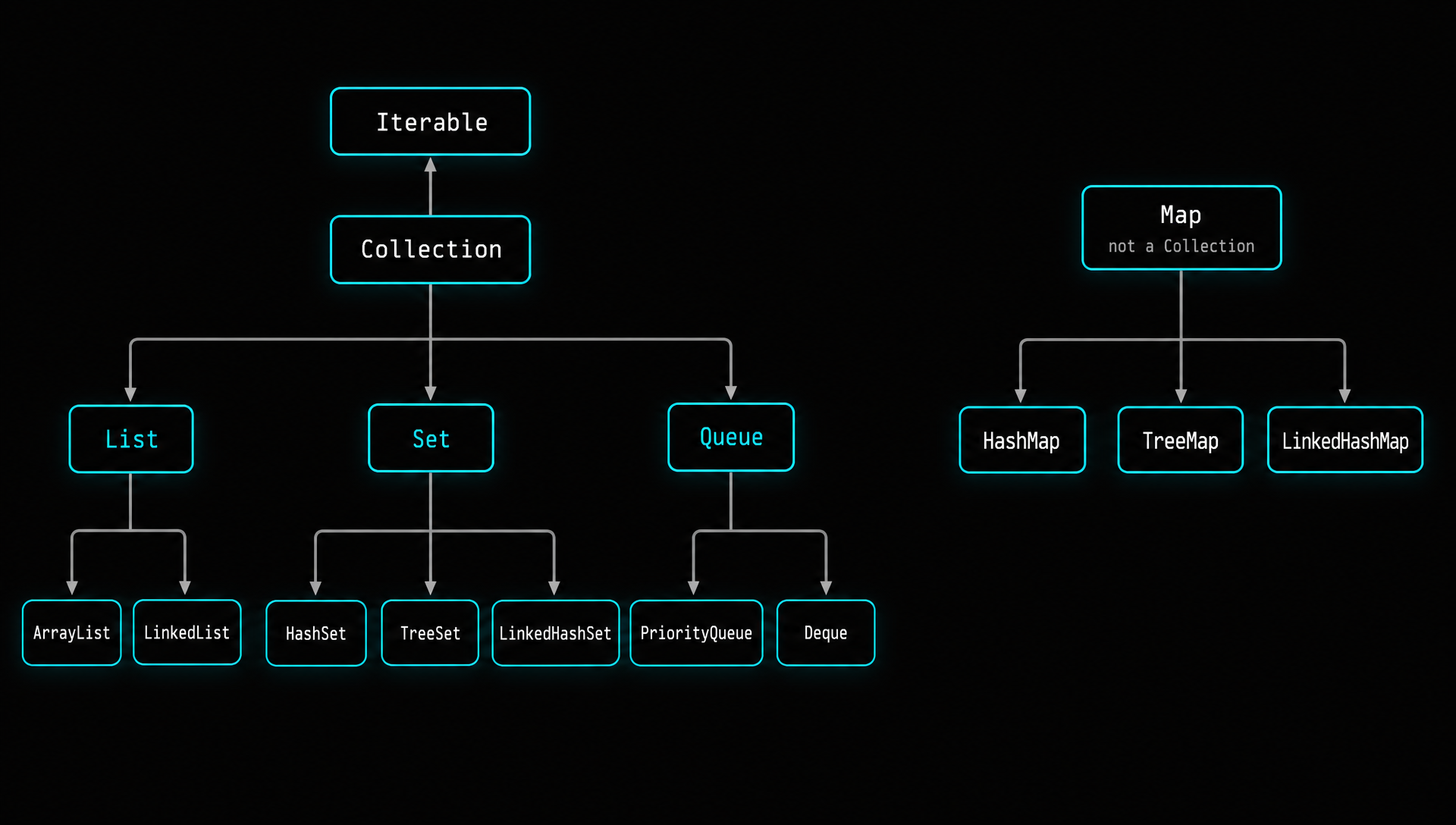
What is the Java Collections Framework?

The Java Collections Framework (JCF) is a unified architecture introduced in Java 1.2 for representing and manipulating groups of objects. It provides a set of interfaces, abstract classes, and concrete implementations that allow developers to store, retrieve, manipulate, and communicate aggregate data in a standardized way. The framework is found in the java.util package and is one of the most heavily used parts of the Java standard library.

Before the Collections Framework existed, Java developers had to use arrays, Vectors, and Hashtables, each with different APIs and no common interface. The framework solved this by introducing a consistent hierarchy of interfaces and classes.

Core Interfaces Hierarchy
Iterable (interface) โ””โ”€โ”€ Collection (interface) โ”œโ”€โ”€ List (interface) : ordered, duplicates allowed โ”‚ โ”œโ”€โ”€ ArrayList (resizable array) โ”‚ โ”œโ”€โ”€ LinkedList (doubly linked list) โ”‚ โ”œโ”€โ”€ Vector (synchronized resizable array) โ”‚ โ”‚ โ””โ”€โ”€ Stack (LIFO stack) โ”‚ โ””โ”€โ”€ CopyOnWriteArrayList (thread safe) โ”‚ โ”œโ”€โ”€ Set (interface) : no duplicates โ”‚ โ”œโ”€โ”€ HashSet (hash table, no order) โ”‚ โ”œโ”€โ”€ LinkedHashSet (hash table + linked list, insertion order) โ”‚ โ””โ”€โ”€ SortedSet (interface) โ”‚ โ””โ”€โ”€ TreeSet (Red Black tree, sorted) โ”‚ โ””โ”€โ”€ Queue (interface) : FIFO processing โ”œโ”€โ”€ PriorityQueue (heap based priority queue) โ”œโ”€โ”€ ArrayDeque (resizable array deque) โ””โ”€โ”€ Deque (interface) : double ended queue โ”œโ”€โ”€ ArrayDeque โ””โ”€โ”€ LinkedList Map (interface) : key value pairs, NOT part of Collection โ”œโ”€โ”€ HashMap (hash table, no order) โ”œโ”€โ”€ LinkedHashMap (hash table + linked list, insertion order) โ”œโ”€โ”€ Hashtable (synchronized, legacy) โ”œโ”€โ”€ WeakHashMap (weak reference keys) โ”œโ”€โ”€ ConcurrentHashMap (thread safe, segment locking) โ””โ”€โ”€ SortedMap (interface) โ””โ”€โ”€ TreeMap (Red Black tree, sorted by keys)
List Interface: Ordered Collections

The List interface represents an ordered collection that allows duplicate elements and maintains insertion order. Elements can be accessed by their integer index position, similar to arrays but with dynamic sizing.

ArrayList: Dynamic Array Implementation

ArrayList is backed by a dynamically resizable array. When the internal array reaches capacity, it creates a new array that is 50% larger and copies all elements over. This makes ArrayList excellent for random access but slower for insertions and deletions in the middle.

// Creating an ArrayList List<String> languages = new ArrayList<>(); // Adding elements languages.add("Java"); // [Java] languages.add("Python"); // [Java, Python] languages.add("Java"); // [Java, Python, Java] : duplicates allowed languages.add(1, "JavaScript"); // [Java, JavaScript, Python, Java] : insert at index // Accessing elements String first = languages.get(0); // "Java" : O(1) random access int index = languages.indexOf("Python"); // 2 // Modifying elements languages.set(0, "Kotlin"); // Replace element at index 0 // Removing elements languages.remove("Java"); // Remove first occurrence languages.remove(0); // Remove by index // Size and checks int size = languages.size(); boolean hasJava = languages.contains("Java"); boolean empty = languages.isEmpty(); // Iterating for (String lang : languages) { System.out.println(lang); } // Using streams (Java 8+) languages.stream() .filter(lang -> lang.startsWith("J")) .map(String::toUpperCase) .forEach(System.out::println); // Creating from existing data List<String> fixed = List.of("A", "B", "C"); // Immutable (Java 9+) List<String> mutable = new ArrayList<>(List.of("A", "B")); // Mutable copy

ArrayList internal resizing behavior:

// Default initial capacity is 10 ArrayList<Integer> list = new ArrayList<>(); // capacity = 10 // When capacity is exceeded, new capacity = old * 1.5 // Add 11th element โ†’ new capacity = 15 // Add 16th element โ†’ new capacity = 22 // Add 23rd element โ†’ new capacity = 33 // You can specify initial capacity to avoid resizing overhead ArrayList<Integer> optimized = new ArrayList<>(1000); // Start with 1000 // Trim to actual size after building optimized.trimToSize();
LinkedList: Doubly Linked List Implementation

LinkedList uses a doubly linked list data structure where each element (node) contains a reference to both the previous and next nodes. It implements both the List and Deque interfaces, making it versatile for stack, queue, and deque operations.

LinkedList<String> list = new LinkedList<>(); // List operations list.add("Second"); list.addFirst("First"); // Add at beginning : O(1) list.addLast("Third"); // Add at end : O(1) // Deque operations (stack behavior) list.push("Zeroth"); // Push to front (like addFirst) String top = list.peek(); // View front without removing String popped = list.pop(); // Remove from front // Queue operations (FIFO behavior) list.offer("Fourth"); // Add to end (like addLast) String head = list.poll(); // Remove from front // Get first and last String first = list.getFirst(); String last = list.getLast(); // Iteration using ListIterator (bidirectional) ListIterator<String> iterator = list.listIterator(); while (iterator.hasNext()) { String item = iterator.next(); if (item.equals("Second")) { iterator.set("Modified"); // Replace during iteration } } // Iterate backwards while (iterator.hasPrevious()) { System.out.println(iterator.previous()); }
Set Interface: Unique Element Collections

The Set interface represents a collection that cannot contain duplicate elements. It models the mathematical set abstraction. When you add a duplicate element, the add method returns false and the set remains unchanged.

HashSet: Hash Table Implementation

HashSet stores elements in a hash table. It uses the element's hashCode() method to determine which bucket the element goes into and the equals() method to check for duplicates. This gives O(1) average time complexity for add, remove, and contains operations.

Set<Integer> numbers = new HashSet<>(); numbers.add(10); numbers.add(20); numbers.add(30); numbers.add(10); // Returns false : duplicate ignored System.out.println(numbers.size()); // 3 // HashSet with custom objects : MUST override hashCode() and equals() class Employee { private int id; private String name; @Override public int hashCode() { return Objects.hash(id, name); } @Override public boolean equals(Object obj) { if (this == obj) return true; if (obj == null || getClass() != obj.getClass()) return false; Employee other = (Employee) obj; return id == other.id && Objects.equals(name, other.name); } } // Set operations Set<Integer> set1 = new HashSet<>(Set.of(1, 2, 3, 4)); Set<Integer> set2 = new HashSet<>(Set.of(3, 4, 5, 6)); // Union Set<Integer> union = new HashSet<>(set1); union.addAll(set2); // [1, 2, 3, 4, 5, 6] // Intersection Set<Integer> intersection = new HashSet<>(set1); intersection.retainAll(set2); // [3, 4] // Difference Set<Integer> difference = new HashSet<>(set1); difference.removeAll(set2); // [1, 2]
TreeSet: Sorted Set Implementation

TreeSet uses a Red Black tree data structure internally, which means all elements are stored in sorted (ascending) order. Every operation (add, remove, contains) has O(log n) time complexity. Elements must be Comparable or you must provide a Comparator.

// Natural ordering (elements must implement Comparable) TreeSet<Integer> sorted = new TreeSet<>(); sorted.add(50); sorted.add(10); sorted.add(30); sorted.add(20); System.out.println(sorted); // [10, 20, 30, 50] // Navigation methods System.out.println(sorted.first()); // 10 System.out.println(sorted.last()); // 50 System.out.println(sorted.lower(30)); // 20 (strictly less than) System.out.println(sorted.higher(30)); // 50 (strictly greater than) System.out.println(sorted.floor(25)); // 20 (less than or equal) System.out.println(sorted.ceiling(25)); // 30 (greater than or equal) // Subset views System.out.println(sorted.headSet(30)); // [10, 20] (less than 30) System.out.println(sorted.tailSet(30)); // [30, 50] (>= 30) System.out.println(sorted.subSet(10, 40)); // [10, 20, 30] (10 inclusive, 40 exclusive) // Custom ordering with Comparator TreeSet<String> descending = new TreeSet<>(Comparator.reverseOrder()); descending.addAll(List.of("Banana", "Apple", "Cherry")); System.out.println(descending); // [Cherry, Banana, Apple] // Custom Comparator for objects TreeSet<Employee> byName = new TreeSet<>( Comparator.comparing(Employee::getName) .thenComparing(Employee::getId) );
Map Interface: Key Value Pairs

The Map interface represents a collection of key value pairs where each key is unique. It is not part of the Collection interface hierarchy but is a core part of the Collections Framework. Maps are essential for lookups, caching, counting, and grouping operations.

HashMap: The Workhorse

HashMap is the most commonly used Map implementation. It stores key value pairs in an array of buckets. The key's hashCode() determines the bucket, and equals() resolves collisions. Since Java 8, when a bucket has more than 8 entries, it converts from a linked list to a balanced tree for O(log n) worst case lookups instead of O(n).

Map<String, Integer> scores = new HashMap<>(); // Adding entries scores.put("Alice", 95); scores.put("Bob", 87); scores.put("Charlie", 92); scores.put("Alice", 98); // Overwrites previous value for "Alice" // Accessing values int aliceScore = scores.get("Alice"); // 98 int defaultScore = scores.getOrDefault("Dave", 0); // 0 // Conditional operations (Java 8+) scores.putIfAbsent("Dave", 75); // Only adds if key not present scores.computeIfAbsent("Eve", k -> calculateScore(k)); // Compute if missing scores.computeIfPresent("Bob", (k, v) -> v + 5); // Modify if present scores.merge("Alice", 2, Integer::sum); // Merge with function // Iterating over a Map // Method 1: entrySet (most efficient) for (Map.Entry<String, Integer> entry : scores.entrySet()) { System.out.println(entry.getKey() + ": " + entry.getValue()); } // Method 2: forEach (Java 8+) scores.forEach((name, score) -> System.out.println(name + ": " + score)); // Method 3: keySet for (String name : scores.keySet()) { System.out.println(name + ": " + scores.get(name)); } // Stream operations on Map (Java 8+) Map<String, Integer> topScorers = scores.entrySet().stream() .filter(e -> e.getValue() >= 90) .sorted(Map.Entry.comparingByValue(Comparator.reverseOrder())) .collect(Collectors.toMap( Map.Entry::getKey, Map.Entry::getValue, (e1, e2) -> e1, LinkedHashMap::new ));
HashMap Internal Working

Understanding how HashMap works internally is one of the most popular Java interview questions. Here is the detailed mechanism.

// HashMap Internal Structure (simplified) // Initial capacity: 16 buckets // Load factor: 0.75 (resize when 75% full) // Resize: doubles capacity // When you call map.put("Alice", 95): // 1. Calculate hashCode: "Alice".hashCode() โ†’ 63417321 // 2. Calculate bucket index: hash & (capacity - 1) โ†’ e.g., index 9 // 3. Check bucket at index 9: // a. If empty โ†’ create new Node and place it there // b. If occupied โ†’ check equals(): // i. If keys equal โ†’ overwrite value // ii. If keys differ โ†’ add to linked list (or tree if > 8 nodes) // Node structure static class Node<K, V> { final int hash; final K key; V value; Node<K, V> next; // Linked list for collisions } // After Java 8: Treeification // When a bucket has > 8 entries โ†’ linked list converts to Red Black tree // When bucket drops to < 6 entries โ†’ tree converts back to linked list // This improves worst case from O(n) to O(log n)
ConcurrentHashMap: Thread Safe Map
// ConcurrentHashMap : thread safe without locking entire map ConcurrentHashMap<String, Integer> concurrentMap = new ConcurrentHashMap<>(); // Thread safe operations concurrentMap.put("key1", 1); concurrentMap.putIfAbsent("key2", 2); // Atomic compute operations concurrentMap.compute("key1", (key, val) -> val == null ? 1 : val + 1); concurrentMap.merge("key1", 1, Integer::sum); // Bulk operations (Java 8+) concurrentMap.forEach(2, (key, value) -> // parallelism threshold = 2 System.out.println(key + "=" + value) ); long sum = concurrentMap.reduceValues(2, Integer::sum); // NEVER use HashMap in multithreaded code : use ConcurrentHashMap instead // Collections.synchronizedMap() is an alternative but locks the entire map
Queue and Deque Interfaces

The Queue interface is designed for holding elements prior to processing, typically in FIFO (First In, First Out) order. The Deque (Double Ended Queue) interface extends Queue and allows insertion and removal at both ends.

PriorityQueue
// Min heap by default (smallest element at the head) Queue<Integer> minHeap = new PriorityQueue<>(); minHeap.offer(30); minHeap.offer(10); minHeap.offer(20); System.out.println(minHeap.poll()); // 10 (smallest) System.out.println(minHeap.peek()); // 20 (next smallest, not removed) // Max heap using reverse comparator Queue<Integer> maxHeap = new PriorityQueue<>(Comparator.reverseOrder()); maxHeap.offer(30); maxHeap.offer(10); maxHeap.offer(20); System.out.println(maxHeap.poll()); // 30 (largest) // PriorityQueue with custom objects Queue<Task> taskQueue = new PriorityQueue<>( Comparator.comparingInt(Task::getPriority) .thenComparing(Task::getCreatedAt) );
ArrayDeque: Stack and Queue Replacement
// ArrayDeque is faster than Stack and LinkedList for stack/queue operations // As a Stack (LIFO) Deque<String> stack = new ArrayDeque<>(); stack.push("First"); stack.push("Second"); stack.push("Third"); System.out.println(stack.pop()); // "Third" System.out.println(stack.peek()); // "Second" // As a Queue (FIFO) Deque<String> queue = new ArrayDeque<>(); queue.offer("First"); queue.offer("Second"); queue.offer("Third"); System.out.println(queue.poll()); // "First" System.out.println(queue.peek()); // "Second"
Collections Utility Class

The java.util.Collections utility class provides static methods for operating on collections, including sorting, searching, shuffling, and creating synchronized or unmodifiable wrappers.

List<Integer> nums = new ArrayList<>(List.of(3, 1, 4, 1, 5, 9, 2, 6)); // Sorting Collections.sort(nums); // [1, 1, 2, 3, 4, 5, 6, 9] Collections.sort(nums, Comparator.reverseOrder()); // Descending // Searching (list must be sorted first) Collections.sort(nums); int index = Collections.binarySearch(nums, 5); // Returns index of 5 // Min, Max int min = Collections.min(nums); int max = Collections.max(nums); // Shuffle, Rotate, Swap Collections.shuffle(nums); // Random order Collections.rotate(nums, 2); // Rotate right by 2 Collections.swap(nums, 0, 1); // Swap elements at indices // Frequency and Disjoint int freq = Collections.frequency(nums, 1); // Count occurrences of 1 boolean noCommon = Collections.disjoint(list1, list2); // No common elements? // Unmodifiable wrappers (Java 9+ preferred: List.of(), Map.of()) List<String> unmodifiable = Collections.unmodifiableList(myList); // Synchronized wrappers List<String> syncList = Collections.synchronizedList(new ArrayList<>()); Map<String, Integer> syncMap = Collections.synchronizedMap(new HashMap<>());
Comparison Tables
ArrayList vs LinkedList
Operation ArrayList LinkedList
Access by index O(1) O(n)
Add at beginning O(n) O(1)
Add at end O(1) amortized O(1)
Add in middle O(n) O(1) if iterator positioned
Remove by index O(n) O(n)
Memory overhead Lower (contiguous array) Higher (node pointers)
Cache performance Excellent (locality) Poor (scattered nodes)
Best for Read heavy workloads Frequent add/remove at ends
HashMap vs TreeMap vs LinkedHashMap
Feature HashMap TreeMap LinkedHashMap
Order No order Sorted by keys Insertion order
Performance O(1) average O(log n) O(1) average
Null keys One allowed Not allowed One allowed
Implementation Hash table Red Black tree Hash table + linked list
Best for Fast lookups Range queries, sorted data LRU caches, ordered iteration
HashSet vs TreeSet vs LinkedHashSet
Feature HashSet TreeSet LinkedHashSet
Order No order Sorted (natural/comparator) Insertion order
Performance O(1) O(log n) O(1)
Null One null allowed No nulls One null allowed
Backed by HashMap TreeMap LinkedHashMap

Interview Tip: Always consider thread safety in interviews. For concurrent access use ConcurrentHashMap instead of HashMap, CopyOnWriteArrayList instead of ArrayList, and ConcurrentLinkedQueue instead of LinkedList. The synchronized wrappers from Collections.synchronizedXxx() work but have lower performance due to coarse grained locking.

Java Memory Structure

Understanding how Java manages memory is critical for writing performant applications and for succeeding in Java interviews. The JVM divides memory into several distinct areas, each serving a specific purpose during program execution. Memory management in Java is largely automatic thanks to the garbage collector, but understanding the underlying mechanics helps developers write efficient code and debug memory related issues.

Memory Areas in JVM
JVM Memory Layout โ”œโ”€โ”€ Heap Memory (shared across all threads) โ”‚ โ”œโ”€โ”€ Young Generation โ”‚ โ”‚ โ”œโ”€โ”€ Eden Space (new objects created here) โ”‚ โ”‚ โ”œโ”€โ”€ Survivor Space S0 (objects that survived 1+ GC) โ”‚ โ”‚ โ””โ”€โ”€ Survivor Space S1 (alternate survivor space) โ”‚ โ”œโ”€โ”€ Old Generation (Tenured) โ”‚ โ”‚ โ””โ”€โ”€ Long lived objects promoted from Young Gen โ”‚ โ””โ”€โ”€ Metaspace (Java 8+, replaced PermGen) โ”‚ โ””โ”€โ”€ Class metadata, method data, constant pool โ”‚ โ”œโ”€โ”€ Stack Memory (one per thread, not shared) โ”‚ โ””โ”€โ”€ Stack Frames (one per method call) โ”‚ โ”œโ”€โ”€ Local Variable Array โ”‚ โ”œโ”€โ”€ Operand Stack โ”‚ โ””โ”€โ”€ Frame Data (constant pool reference) โ”‚ โ”œโ”€โ”€ PC (Program Counter) Register (one per thread) โ”‚ โ””โ”€โ”€ Address of current bytecode instruction โ”‚ โ””โ”€โ”€ Native Method Stack (one per thread) โ””โ”€โ”€ For native (C/C++) method calls via JNI
Heap Memory Deep Dive

The heap is the largest area of JVM memory and is where all objects and their instance variables are stored. Every time you use the new keyword, the object is allocated on the heap. The heap is shared among all threads, which means any thread can access any object on the heap (provided it has a reference to it).

  • Shared among all threads in the application
  • Created at JVM startup and exists for the entire lifetime of the application
  • Garbage collection operates exclusively on the heap to reclaim unreferenced objects
  • Size controlled by JVM flags: -Xms sets the initial heap size and -Xmx sets the maximum heap size
  • Throws OutOfMemoryError when the heap is full and the garbage collector cannot free enough space
Young Generation

The Young Generation is where all new objects are initially allocated. It is divided into three spaces: Eden and two Survivor spaces (S0 and S1). Most objects are short lived and die young, so the Young Generation is designed for fast allocation and collection.

  • Eden Space is where brand new objects are allocated. When Eden fills up, a Minor GC is triggered
  • Survivor Spaces (S0 and S1) hold objects that survived at least one garbage collection cycle. Objects are copied between S0 and S1 during each Minor GC
  • Minor GC occurs frequently in the Young Generation and is typically very fast (milliseconds)
  • Objects that survive enough GC cycles (configurable via -XX:MaxTenuringThreshold, default 15) are promoted to Old Generation
Old Generation (Tenured)

The Old Generation stores long lived objects that have survived multiple garbage collection cycles in the Young Generation. These are typically objects referenced throughout the application's lifetime such as cached data, singleton instances, and long running service objects.

  • Major GC (or Full GC) occurs here and is significantly slower than Minor GC
  • Full GC typically causes "stop the world" pauses where all application threads are halted
  • Proper sizing of Young and Old generations is key to minimizing GC pauses
Metaspace (Java 8+)

Metaspace replaced the older PermGen (Permanent Generation) starting in Java 8. It stores class metadata, method data, and the runtime constant pool. Unlike PermGen, Metaspace uses native memory and can grow dynamically.

// Metaspace flags -XX:MetaspaceSize=256m // Initial metaspace size -XX:MaxMetaspaceSize=512m // Maximum metaspace size // If you see "java.lang.OutOfMemoryError: Metaspace" // it means too many classes are being loaded (common with // frameworks that use dynamic proxies or bytecode generation)
Stack Memory

The stack stores method call information and local variables. Each thread in Java gets its own private stack, which means stack data is inherently thread safe. The stack follows a LIFO (Last In, First Out) structure where each method call creates a new stack frame that is pushed onto the stack and popped off when the method returns.

  • One stack per thread means stack memory is not shared between threads
  • Stack frames are created for each method call and contain local variables, method parameters, and return addresses
  • Primitive values (int, float, boolean, etc.) are stored directly in the stack frame
  • Object references are stored in the stack, but the actual objects they point to are on the heap
  • Automatically cleaned up when a method returns, its stack frame is popped and all local variables are destroyed
  • Size controlled by the -Xss flag (default is typically 512KB or 1MB depending on platform)
  • Throws StackOverflowError when the stack is full, typically caused by deep or infinite recursion
Heap vs Stack: Complete Comparison
Feature Heap Stack
What is stored Objects and instance variables Method calls, local variables, references
Access speed Slower (pointer lookup) Faster (direct memory offset)
Size Much larger (GBs possible) Smaller (typically 512KB to 1MB per thread)
Lifetime Until garbage collected Until method returns
Thread safety Shared (requires synchronization) Thread local (inherently safe)
Error on overflow java.lang.OutOfMemoryError java.lang.StackOverflowError
Allocation Dynamic, managed by GC Static, LIFO ordered
Fragmentation Can become fragmented Never fragmented
Memory Allocation Example

Let us trace through a code example to understand exactly what goes on the stack versus the heap.

public class MemoryExample { // Static variable โ†’ stored in Metaspace static int counter = 0; public static void main(String[] args) { // 'args' reference โ†’ Stack | String[] object โ†’ Heap int age = 25; // 'age' primitive โ†’ Stack (directly stored) String name = "John"; // 'name' reference โ†’ Stack // "John" String object โ†’ Heap (String pool area) String name2 = new String("John"); // 'name2' reference โ†’ Stack // new String object โ†’ Heap (NOT in string pool) // name == name2 โ†’ false (different objects) // name.equals(name2) โ†’ true (same content) Person p = new Person("Alice", 30); // 'p' reference โ†’ Stack // Person object โ†’ Heap // Person.name reference โ†’ inside Person object on Heap // "Alice" String โ†’ Heap (String pool) // Person.age (primitive) โ†’ inside Person object on Heap calculateSum(10, 20); // New stack frame pushed for calculateSum() } static int calculateSum(int a, int b) { // 'a' = 10 โ†’ new Stack frame // 'b' = 20 โ†’ new Stack frame int result = a + b; // 'result' = 30 โ†’ Stack frame return result; // Stack frame popped, all local variables destroyed } } // Memory state during calculateSum() execution: // // STACK (main thread) HEAP // โ”Œโ”€โ”€โ”€โ”€โ”€โ”€โ”€โ”€โ”€โ”€โ”€โ”€โ”€โ”€โ”€โ”€โ”€โ” โ”Œโ”€โ”€โ”€โ”€โ”€โ”€โ”€โ”€โ”€โ”€โ”€โ”€โ”€โ”€โ”€โ”€โ”€โ”€โ”€โ”€โ”€โ”€โ” // โ”‚ calculateSum() โ”‚ โ”‚ String "John" (pool) โ”‚ // โ”‚ a = 10 โ”‚ โ”‚ String "John" (new) โ”‚ // โ”‚ b = 20 โ”‚ โ”‚ String "Alice" (pool) โ”‚ // โ”‚ result = 30 โ”‚ โ”‚ Person { name, age=30 }โ”‚ // โ”œโ”€โ”€โ”€โ”€โ”€โ”€โ”€โ”€โ”€โ”€โ”€โ”€โ”€โ”€โ”€โ”€โ”€โ”ค โ”‚ String[] args โ”‚ // โ”‚ main() โ”‚ โ””โ”€โ”€โ”€โ”€โ”€โ”€โ”€โ”€โ”€โ”€โ”€โ”€โ”€โ”€โ”€โ”€โ”€โ”€โ”€โ”€โ”€โ”€โ”˜ // โ”‚ age = 25 โ”‚ // โ”‚ name โ†’ ref โ”‚ METASPACE // โ”‚ name2 โ†’ ref โ”‚ โ”Œโ”€โ”€โ”€โ”€โ”€โ”€โ”€โ”€โ”€โ”€โ”€โ”€โ”€โ”€โ”€โ”€โ”€โ”€โ”€โ”€โ”€โ”€โ” // โ”‚ p โ†’ ref โ”‚ โ”‚ Class metadata โ”‚ // โ”‚ args โ†’ ref โ”‚ โ”‚ counter = 0 โ”‚ // โ””โ”€โ”€โ”€โ”€โ”€โ”€โ”€โ”€โ”€โ”€โ”€โ”€โ”€โ”€โ”€โ”€โ”€โ”˜ โ””โ”€โ”€โ”€โ”€โ”€โ”€โ”€โ”€โ”€โ”€โ”€โ”€โ”€โ”€โ”€โ”€โ”€โ”€โ”€โ”€โ”€โ”€โ”˜
String Pool and Memory

The String Pool (also called the String Intern Pool) is a special area within the heap where Java stores literal string values. When you create a string using a literal, Java first checks the pool. If the same string already exists, it returns a reference to the existing object instead of creating a new one. This optimization saves significant memory in applications that use many strings.

// String pool behavior String s1 = "Hello"; // Created in String pool String s2 = "Hello"; // Reuses same object from pool String s3 = new String("Hello"); // New object on heap (NOT pool) System.out.println(s1 == s2); // true (same reference) System.out.println(s1 == s3); // false (different objects) System.out.println(s1.equals(s3)); // true (same content) // Interning: move heap string into pool String s4 = s3.intern(); System.out.println(s1 == s4); // true (now same reference) // String concatenation and memory String result = ""; for (int i = 0; i < 1000; i++) { result += i; // BAD: creates 1000 intermediate String objects on heap } // Use StringBuilder instead StringBuilder sb = new StringBuilder(); for (int i = 0; i < 1000; i++) { sb.append(i); // GOOD: single mutable object, no waste } String result = sb.toString();
Garbage Collection Deep Dive

Garbage Collection (GC) is the automatic process by which the JVM identifies and removes objects that are no longer reachable from any live reference in the application. This frees up heap memory for new object allocations. Unlike C and C++ where developers must manually free memory, Java's garbage collector handles this entirely behind the scenes.

How GC Determines Object Eligibility

The garbage collector uses a concept called reachability analysis. Starting from a set of "GC roots" (such as local variables, static fields, and active thread references), the collector traverses all object references. Any object that cannot be reached from any GC root is considered eligible for garbage collection.

// GC Roots include: // 1. Local variables in active stack frames // 2. Active Java threads // 3. Static fields of loaded classes // 4. JNI references // Making objects eligible for GC: // Method 1: Nullifying the reference Person p = new Person("Alice", 25); p = null; // Person object is now eligible for GC // Method 2: Reassigning the reference Person p1 = new Person("Bob", 30); Person p2 = new Person("Charlie", 35); p1 = p2; // Bob's Person object is now eligible // Method 3: Object goes out of scope void createPerson() { Person p = new Person("Dave", 40); } // After method returns, Dave's Person is eligible // Method 4: Island of isolation class Node { Node next; } Node a = new Node(); Node b = new Node(); a.next = b; // a references b b.next = a; // b references a (circular reference) a = null; b = null; // Both nodes are eligible despite referencing each other // because neither is reachable from any GC root
GC Algorithms Comparison
GC Algorithm Threads Pause Time Best For JVM Flag
Serial GC Single threaded High (STW) Small apps, single CPU -XX:+UseSerialGC
Parallel GC Multi threaded Medium (STW) Throughput focused batch jobs -XX:+UseParallelGC
G1 GC Multi threaded Low to medium General purpose (default Java 9+) -XX:+UseG1GC
ZGC Concurrent Very low (<10ms) Large heaps, low latency -XX:+UseZGC
Shenandoah Concurrent Very low Low latency, any heap size -XX:+UseShenandoahGC
Memory Leaks in Java

Contrary to popular belief, Java applications can absolutely have memory leaks. A memory leak in Java occurs when objects are no longer needed by the application but still have active references, preventing the garbage collector from reclaiming them. Over time this causes the heap to fill up and eventually results in an OutOfMemoryError.

// Common memory leak patterns: // 1. Static collections that grow indefinitely public class EventLog { // BAD: this list will grow forever and never be cleaned up private static List<Event> events = new ArrayList<>(); public static void log(Event event) { events.add(event); // Objects accumulate, never removed } } // 2. Unclosed resources public void readFile() { // BAD: if exception occurs, stream is never closed FileInputStream fis = new FileInputStream("data.txt"); // ... use fis ... fis.close(); // GOOD: try with resources guarantees closure try (FileInputStream fis = new FileInputStream("data.txt")) { // ... use fis ... } // Automatically closed even if exception occurs } // 3. Listener/callback not removed button.addActionListener(myListener); // ... later, when no longer needed: button.removeActionListener(myListener); // MUST remove! // 4. Using WeakReference for caches to prevent leaks Map<String, WeakReference<BigObject>> cache = new HashMap<>(); cache.put("key", new WeakReference<>(new BigObject())); // WeakReference allows GC to collect BigObject if no other references exist // Better: use WeakHashMap WeakHashMap<Key, Value> cache = new WeakHashMap<>(); // Keys are held with weak references, entries removed when key is GC'd
Monitoring Memory with JVM Tools
// Runtime memory information Runtime runtime = Runtime.getRuntime(); long totalMemory = runtime.totalMemory(); // Current heap size long freeMemory = runtime.freeMemory(); // Free space in heap long maxMemory = runtime.maxMemory(); // Maximum heap size (-Xmx) long usedMemory = totalMemory - freeMemory; // Currently used System.out.println("Used: " + usedMemory / (1024 * 1024) + " MB"); System.out.println("Free: " + freeMemory / (1024 * 1024) + " MB"); System.out.println("Max: " + maxMemory / (1024 * 1024) + " MB"); // Request garbage collection (no guarantee it will run) System.gc(); // Suggests GC, JVM may ignore this // Command line tools for monitoring: // jps : list running Java processes // jstat -gc PID : GC statistics // jmap -heap PID : heap summary // jmap -dump:format=b,file=heap.hprof PID : heap dump // jconsole : GUI monitoring tool // jvisualvm : Advanced profiling tool

Interview Tip: When asked about memory leaks, mention static collections, unclosed resources, listener registrations, and inner classes holding references to outer class instances. For prevention, recommend try with resources, WeakReferences, proper deregistration patterns, and memory profiling tools like VisualVM, Eclipse MAT, or async profiler.

Understanding Multithreading in Java

Multithreading is one of Java's most powerful features and one of the most commonly tested topics in Java interviews. It allows a program to execute multiple tasks simultaneously within a single process, making efficient use of modern multi core processors. Java was one of the first mainstream languages to provide built in support for multithreading at the language level.

What is a Thread?

A thread is the smallest unit of execution within a process. Every Java program starts with at least one thread called the "main" thread, which is created by the JVM when you call the main() method. From there, you can create additional threads to perform tasks concurrently.

Process vs Thread
Feature Process Thread
Weight Heavyweight Lightweight
Memory Separate memory space Shared memory (heap) + own stack
Creation cost Expensive Relatively cheap
Communication IPC (inter process communication) Direct via shared memory
Crash impact Isolated (other processes unaffected) Can crash entire process
Context switch Slower Faster
Creating Threads in Java

Java provides multiple ways to create and manage threads. Each approach has its own advantages depending on the use case.

Method 1: Extending the Thread Class
class DownloadThread extends Thread { private String url; public DownloadThread(String url) { this.url = url; } @Override public void run() { System.out.println(Thread.currentThread().getName() + " downloading: " + url); // Simulate download try { Thread.sleep(2000); } catch (InterruptedException e) { e.printStackTrace(); } System.out.println(Thread.currentThread().getName() + " finished: " + url); } } // Usage DownloadThread t1 = new DownloadThread("file1.zip"); DownloadThread t2 = new DownloadThread("file2.zip"); t1.start(); // start() creates new thread and calls run() t2.start(); // Both downloads run in parallel // NEVER call run() directly : it runs in the current thread, not a new one! // t1.run(); // WRONG: runs in main thread, no parallelism
Method 2: Implementing Runnable Interface (Preferred)
class DownloadTask implements Runnable { private String url; public DownloadTask(String url) { this.url = url; } @Override public void run() { System.out.println(Thread.currentThread().getName() + " downloading: " + url); } } // Usage Thread t1 = new Thread(new DownloadTask("file1.zip"), "Downloader-1"); Thread t2 = new Thread(new DownloadTask("file2.zip"), "Downloader-2"); t1.start(); t2.start(); // Lambda syntax (Java 8+) : cleanest approach for simple tasks Thread t3 = new Thread(() -> { System.out.println("Running in thread: " + Thread.currentThread().getName()); }); t3.start();

Why Runnable is preferred over extending Thread: Java does not support multiple inheritance for classes. If you extend Thread, your class cannot extend any other class. Implementing Runnable keeps your class hierarchy flexible. Additionally, Runnable promotes better separation of concerns by separating the task (what to do) from the thread mechanism (how to execute it).

Method 3: Implementing Callable (Returns a Result)
import java.util.concurrent.*; class PriceCalculator implements Callable<Double> { private String product; public PriceCalculator(String product) { this.product = product; } @Override public Double call() throws Exception { // Simulate complex price calculation Thread.sleep(1000); return Math.random() * 100; } } // Usage with ExecutorService ExecutorService executor = Executors.newFixedThreadPool(3); Future<Double> future1 = executor.submit(new PriceCalculator("Laptop")); Future<Double> future2 = executor.submit(new PriceCalculator("Phone")); // get() blocks until result is available Double price1 = future1.get(); // Blocks until done Double price2 = future2.get(5, TimeUnit.SECONDS); // Blocks with timeout System.out.println("Laptop price: " + price1); System.out.println("Phone price: " + price2); executor.shutdown();
Thread Lifecycle and States
Thread States (java.lang.Thread.State): NEW โ†’ Thread created but not yet started (before start() call) โ”‚ โ†“ start() RUNNABLE โ†’ Ready to run or currently running (JVM scheduler decides) โ”‚ โ”œโ”€โ”€ โ†’ BLOCKED (waiting to acquire a monitor lock) โ”‚ โ†“ โ”‚ Acquires lock โ†’ RUNNABLE โ”‚ โ”œโ”€โ”€ โ†’ WAITING (waiting indefinitely: wait(), join(), park()) โ”‚ โ†“ โ”‚ notify()/notifyAll()/unpark() โ†’ RUNNABLE โ”‚ โ”œโ”€โ”€ โ†’ TIMED_WAITING (waiting with timeout: sleep(), wait(ms), join(ms)) โ”‚ โ†“ โ”‚ Timeout expires or notified โ†’ RUNNABLE โ”‚ โ†“ TERMINATED โ†’ Thread has completed execution (run() finished or exception thrown)
// Check thread state programmatically Thread t = new Thread(() -> { try { Thread.sleep(5000); } catch (InterruptedException e) {} }); System.out.println(t.getState()); // NEW t.start(); System.out.println(t.getState()); // RUNNABLE Thread.sleep(100); System.out.println(t.getState()); // TIMED_WAITING (sleeping) t.join(); System.out.println(t.getState()); // TERMINATED
Synchronization: Preventing Race Conditions

Synchronization is the mechanism that ensures only one thread can access a shared resource at a time. Without synchronization, multiple threads reading and writing shared data simultaneously can cause race conditions where the outcome depends on unpredictable thread scheduling.

The Race Condition Problem
// WITHOUT synchronization : race condition! class BankAccount { private double balance = 1000; // NOT thread safe! public void withdraw(double amount) { if (balance >= amount) { // Thread A checks: 1000 >= 500 โœ“ // Thread B also checks: 1000 >= 800 โœ“ (not yet updated!) try { Thread.sleep(1); } catch (InterruptedException e) {} balance -= amount; // Thread A: balance = 500 // Thread B: balance = 500 - 800 = -300! NEGATIVE BALANCE! } } } // Two threads withdrawing simultaneously BankAccount account = new BankAccount(); Thread t1 = new Thread(() -> account.withdraw(500)); Thread t2 = new Thread(() -> account.withdraw(800)); t1.start(); t2.start(); // Both might succeed, resulting in negative balance!
Synchronized Methods
class BankAccount { private double balance = 1000; // Thread safe : only one thread can execute this at a time public synchronized void withdraw(double amount) { if (balance >= amount) { balance -= amount; System.out.println("Withdrew: " + amount + ", Balance: " + balance); } else { System.out.println("Insufficient funds"); } } public synchronized double getBalance() { return balance; } }
Synchronized Blocks (More Granular Control)
class BankAccount { private double balance = 1000; private final Object lock = new Object(); public void withdraw(double amount) { // Only the critical section is synchronized // Non critical code runs without locking System.out.println("Processing withdrawal request..."); synchronized (lock) { if (balance >= amount) { balance -= amount; } } // Non critical code can run in parallel System.out.println("Withdrawal processed"); } public void deposit(double amount) { synchronized (lock) { // Same lock object balance += amount; } } }
Inter Thread Communication

Threads often need to coordinate with each other. Java provides wait(), notify(), and notifyAll() methods on the Object class for inter thread communication. These methods must be called from within a synchronized context.

// Producer Consumer Pattern using wait/notify class SharedBuffer { private Queue<Integer> queue = new LinkedList<>(); private int capacity; public SharedBuffer(int capacity) { this.capacity = capacity; } public synchronized void produce(int item) throws InterruptedException { while (queue.size() == capacity) { System.out.println("Buffer full, producer waiting..."); wait(); // Release lock and wait } queue.add(item); System.out.println("Produced: " + item + " | Buffer size: " + queue.size()); notifyAll(); // Wake up waiting consumers } public synchronized int consume() throws InterruptedException { while (queue.isEmpty()) { System.out.println("Buffer empty, consumer waiting..."); wait(); // Release lock and wait } int item = queue.poll(); System.out.println("Consumed: " + item + " | Buffer size: " + queue.size()); notifyAll(); // Wake up waiting producers return item; } } // Usage SharedBuffer buffer = new SharedBuffer(5); Thread producer = new Thread(() -> { for (int i = 1; i <= 10; i++) { try { buffer.produce(i); } catch (InterruptedException e) {} } }); Thread consumer = new Thread(() -> { for (int i = 0; i < 10; i++) { try { buffer.consume(); } catch (InterruptedException e) {} } }); producer.start(); consumer.start();
Deadlock: Causes and Prevention

Deadlock occurs when two or more threads are permanently blocked, each waiting for a lock held by the other. This creates a circular dependency that can never be resolved, effectively freezing the affected threads forever.

// Classic deadlock scenario class DeadlockDemo { private final Object lockA = new Object(); private final Object lockB = new Object(); // Thread 1 acquires lockA, then tries to acquire lockB public void method1() { synchronized (lockA) { System.out.println("Thread 1: holding lockA, waiting for lockB..."); try { Thread.sleep(50); } catch (InterruptedException e) {} synchronized (lockB) { System.out.println("Thread 1: holding both locks"); } } } // Thread 2 acquires lockB, then tries to acquire lockA public void method2() { synchronized (lockB) { // OPPOSITE ORDER! This causes deadlock System.out.println("Thread 2: holding lockB, waiting for lockA..."); try { Thread.sleep(50); } catch (InterruptedException e) {} synchronized (lockA) { System.out.println("Thread 2: holding both locks"); } } } } // FIX: Always acquire locks in the SAME order public void method2Fixed() { synchronized (lockA) { // Same order as method1 synchronized (lockB) { System.out.println("Thread 2: holding both locks (no deadlock)"); } } }
Four Conditions for Deadlock

All four of these conditions must be true simultaneously for a deadlock to occur. Breaking any one of them prevents deadlock.

  1. Mutual Exclusion means a resource can only be held by one thread at a time
  2. Hold and Wait means a thread holds one resource while waiting for another
  3. No Preemption means a resource cannot be forcibly taken from a thread
  4. Circular Wait means two or more threads form a circular chain of lock dependencies
Executor Framework and Thread Pools (Modern Approach)

The Executor Framework, introduced in Java 5, provides a higher level abstraction for managing threads. Instead of manually creating and managing Thread objects, you submit tasks to thread pools that handle the threading details for you. This is the recommended way to manage concurrency in modern Java applications.

import java.util.concurrent.*; // Fixed Thread Pool : best for CPU bound tasks ExecutorService fixedPool = Executors.newFixedThreadPool( Runtime.getRuntime().availableProcessors() ); // Submit multiple tasks List<Future<String>> futures = new ArrayList<>(); for (int i = 0; i < 20; i++) { final int taskId = i; futures.add(fixedPool.submit(() -> { Thread.sleep(1000); return "Task " + taskId + " completed by " + Thread.currentThread().getName(); })); } // Collect results for (Future<String> future : futures) { System.out.println(future.get()); // Blocks until each task completes } fixedPool.shutdown(); fixedPool.awaitTermination(30, TimeUnit.SECONDS); // Cached Thread Pool : best for IO bound tasks, many short lived tasks ExecutorService cachedPool = Executors.newCachedThreadPool(); // Scheduled Thread Pool : for delayed or periodic execution ScheduledExecutorService scheduler = Executors.newScheduledThreadPool(2); scheduler.scheduleAtFixedRate( () -> System.out.println("Heartbeat: " + System.currentTimeMillis()), 0, // initial delay 5, // period TimeUnit.SECONDS ); // Single Thread Executor : guarantees sequential execution ExecutorService single = Executors.newSingleThreadExecutor();
CompletableFuture: Async Programming (Java 8+)
import java.util.concurrent.CompletableFuture; // Asynchronous computation without blocking CompletableFuture<String> future = CompletableFuture .supplyAsync(() -> { // Runs in ForkJoinPool.commonPool() return fetchDataFromAPI(); }) .thenApply(data -> { // Transform the result return parseData(data); }) .thenApply(parsed -> { // Further transformation return formatOutput(parsed); }) .exceptionally(ex -> { // Handle any exception in the chain System.err.println("Error: " + ex.getMessage()); return "default value"; }); // Combining multiple async operations CompletableFuture<String> userFuture = CompletableFuture.supplyAsync(() -> fetchUser()); CompletableFuture<String> orderFuture = CompletableFuture.supplyAsync(() -> fetchOrders()); // Wait for both to complete CompletableFuture<Void> combined = CompletableFuture.allOf(userFuture, orderFuture); combined.thenRun(() -> { String user = userFuture.join(); String orders = orderFuture.join(); System.out.println("User: " + user + ", Orders: " + orders); }); // Wait for first to complete CompletableFuture<Object> fastest = CompletableFuture.anyOf(userFuture, orderFuture);
Virtual Threads (Java 21+, Project Loom)

Virtual Threads are a groundbreaking addition in Java 21 that allow creating millions of lightweight threads with minimal overhead. Traditional platform threads map 1:1 to OS threads (expensive, limited to thousands). Virtual threads are managed by the JVM and are mounted on platform threads only when executing CPU work.

// Creating virtual threads (Java 21+) Thread vThread = Thread.startVirtualThread(() -> { System.out.println("Hello from virtual thread!"); }); // Using Thread.ofVirtual() Thread vThread2 = Thread.ofVirtual() .name("my-virtual-thread") .start(() -> { System.out.println("Named virtual thread running"); }); // Virtual thread executor : creates a new virtual thread per task try (var executor = Executors.newVirtualThreadPerTaskExecutor()) { // Submit 100,000 tasks : each gets its own virtual thread! List<Future<String>> futures = new ArrayList<>(); for (int i = 0; i < 100_000; i++) { final int taskId = i; futures.add(executor.submit(() -> { Thread.sleep(1000); // Simulate IO return "Result " + taskId; })); } // All 100K tasks complete in ~1 second (not 100K seconds!) } // Checking if thread is virtual Thread.currentThread().isVirtual(); // true for virtual threads
Volatile Keyword

The volatile keyword ensures that a variable's value is always read from and written to main memory, preventing threads from caching stale values in their local CPU cache.

class StoppableTask implements Runnable { // Without volatile, the worker thread might never see the updated value private volatile boolean running = true; public void run() { while (running) { // Always reads from main memory // Do work } System.out.println("Thread stopped"); } public void stop() { running = false; // Write immediately visible to all threads } } // volatile guarantees VISIBILITY but NOT atomicity // For atomic operations, use AtomicInteger, AtomicBoolean, etc. AtomicInteger counter = new AtomicInteger(0); counter.incrementAndGet(); // Atomic increment counter.compareAndSet(1, 2); // Atomic compare and swap counter.addAndGet(5); // Atomic add

Interview Tip: Know the difference between volatile and synchronized. Volatile guarantees visibility (all threads see the latest value) but not atomicity. Synchronized guarantees both visibility and atomicity but with higher overhead. For simple flag variables use volatile. For compound operations (check then act, read modify write) use synchronized or Atomic classes.

Exception Handling in Java

Exception handling is a robust mechanism in Java for dealing with runtime errors and exceptional conditions that disrupt the normal flow of program execution. Rather than letting errors crash your application, Java provides structured ways to catch, handle, and recover from these situations gracefully. Proper exception handling is one of the hallmarks of production quality Java code and is extensively tested in interviews.

What is an Exception?

An exception is an event that occurs during program execution that disrupts the normal instruction flow. When an exception occurs, Java creates an exception object containing information about the error (type, message, stack trace) and hands it to the runtime system. This process is called "throwing" an exception.

Complete Exception Hierarchy
java.lang.Object โ””โ”€โ”€ java.lang.Throwable โ”œโ”€โ”€ java.lang.Error (DO NOT catch these : JVM/system level problems) โ”‚ โ”œโ”€โ”€ OutOfMemoryError (heap exhausted) โ”‚ โ”œโ”€โ”€ StackOverflowError (infinite recursion) โ”‚ โ”œโ”€โ”€ VirtualMachineError (JVM broken) โ”‚ โ”œโ”€โ”€ NoClassDefFoundError (class missing at runtime) โ”‚ โ””โ”€โ”€ AssertionError (assert statement failed) โ”‚ โ””โ”€โ”€ java.lang.Exception โ”œโ”€โ”€ Checked Exceptions (MUST handle at compile time) โ”‚ โ”œโ”€โ”€ IOException โ”‚ โ”‚ โ”œโ”€โ”€ FileNotFoundException โ”‚ โ”‚ โ””โ”€โ”€ EOFException โ”‚ โ”œโ”€โ”€ SQLException โ”‚ โ”œโ”€โ”€ ClassNotFoundException โ”‚ โ”œโ”€โ”€ InterruptedException โ”‚ โ”œโ”€โ”€ CloneNotSupportedException โ”‚ โ””โ”€โ”€ ReflectiveOperationException โ”‚ โ””โ”€โ”€ java.lang.RuntimeException (Unchecked : optional to handle) โ”œโ”€โ”€ NullPointerException โ”œโ”€โ”€ ArrayIndexOutOfBoundsException โ”œโ”€โ”€ StringIndexOutOfBoundsException โ”œโ”€โ”€ ArithmeticException โ”œโ”€โ”€ NumberFormatException โ”œโ”€โ”€ ClassCastException โ”œโ”€โ”€ IllegalArgumentException โ”œโ”€โ”€ IllegalStateException โ”œโ”€โ”€ UnsupportedOperationException โ””โ”€โ”€ ConcurrentModificationException
Checked vs Unchecked Exceptions
Feature Checked Exceptions Unchecked Exceptions
Verification time Compile time Runtime
Must handle? Yes (try catch or declare with throws) No (optional but recommended)
Extends Exception (but not RuntimeException) RuntimeException
Cause External factors (file, network, DB) Programming errors (bugs)
Examples IOException, SQLException NullPointerException, ClassCastException
Recovery Often recoverable Usually indicates a bug to fix
Try Catch Finally: Complete Syntax
try { // Code that may throw exception FileReader reader = new FileReader("config.txt"); int data = reader.read(); } catch (FileNotFoundException e) { // Handle specific exception first (most specific to least specific) System.err.println("Config file not found: " + e.getMessage()); // Create default config instead } catch (IOException e) { // Handle broader exception System.err.println("IO error reading config: " + e.getMessage()); } catch (Exception e) { // Catch all remaining exceptions (use sparingly) System.err.println("Unexpected error: " + e.getMessage()); e.printStackTrace(); // Print full stack trace for debugging } finally { // ALWAYS executes regardless of exception // Use for cleanup: closing resources, releasing locks, etc. System.out.println("Cleanup complete"); // finally only skipped if System.exit() called or JVM crashes }
Try With Resources (Java 7+): Automatic Resource Management

The try with resources statement ensures that each resource is closed at the end of the statement, even if an exception occurs. This is the preferred way to handle any object that implements the AutoCloseable interface.

// Modern approach : resources automatically closed try (FileReader fileReader = new FileReader("data.txt"); BufferedReader bufferedReader = new BufferedReader(fileReader); FileWriter fileWriter = new FileWriter("output.txt")) { String line; while ((line = bufferedReader.readLine()) != null) { fileWriter.write(line.toUpperCase() + "\n"); } } catch (IOException e) { System.err.println("File processing error: " + e.getMessage()); } // All three resources are automatically closed in reverse order: // fileWriter.close() โ†’ bufferedReader.close() โ†’ fileReader.close() // Database example try (Connection conn = DriverManager.getConnection(url, user, pass); PreparedStatement stmt = conn.prepareStatement("SELECT * FROM users WHERE id = ?")) { stmt.setInt(1, userId); try (ResultSet rs = stmt.executeQuery()) { while (rs.next()) { System.out.println(rs.getString("name")); } } } catch (SQLException e) { System.err.println("Database error: " + e.getMessage()); } // Custom AutoCloseable class DatabaseConnection implements AutoCloseable { public DatabaseConnection() { System.out.println("Connection opened"); } @Override public void close() { System.out.println("Connection closed automatically"); } } try (DatabaseConnection conn = new DatabaseConnection()) { // Use connection } // close() called automatically
Throw vs Throws
throw: Explicitly Throwing an Exception
public class Validator { public static void validateAge(int age) { if (age < 0) { throw new IllegalArgumentException("Age cannot be negative: " + age); } if (age < 18) { throw new IllegalArgumentException("Must be 18 or older, got: " + age); } System.out.println("Age validated: " + age); } public static void validateEmail(String email) { if (email == null || email.isBlank()) { throw new NullPointerException("Email cannot be null or blank"); } if (!email.contains("@")) { throw new IllegalArgumentException("Invalid email format: " + email); } } }
throws: Declaring Exceptions in Method Signature
// Checked exceptions MUST be declared with throws (or caught) public String readFile(String path) throws IOException { BufferedReader reader = new BufferedReader(new FileReader(path)); return reader.readLine(); } // Multiple exceptions in throws clause public void processData(String path) throws IOException, SQLException, ParseException { String data = readFile(path); saveToDatabase(data); parseResult(data); } // Caller must handle the declared exceptions public void caller() { try { processData("input.txt"); } catch (IOException e) { System.err.println("File error: " + e.getMessage()); } catch (SQLException e) { System.err.println("Database error: " + e.getMessage()); } catch (ParseException e) { System.err.println("Parse error: " + e.getMessage()); } }
Feature throw throws
Location Inside method body In method signature
Purpose Actually throws an exception object Declares that method may throw exceptions
Count One exception at a time Multiple exception types allowed
Followed by Exception instance (new ...) Exception class names
Custom Exceptions

Creating custom exceptions allows you to define domain specific error types that provide meaningful context about what went wrong in your application. This is a best practice in production code.

// Custom checked exception public class InsufficientFundsException extends Exception { private double amount; private double balance; public InsufficientFundsException(double amount, double balance) { super(String.format("Cannot withdraw %.2f, current balance is %.2f", amount, balance)); this.amount = amount; this.balance = balance; } public double getAmount() { return amount; } public double getBalance() { return balance; } public double getDeficit() { return amount - balance; } } // Custom unchecked exception public class UserNotFoundException extends RuntimeException { private String userId; public UserNotFoundException(String userId) { super("User not found with ID: " + userId); this.userId = userId; } public String getUserId() { return userId; } } // Using custom exceptions public class BankService { public void withdraw(String accountId, double amount) throws InsufficientFundsException { Account account = findAccount(accountId); if (account == null) { throw new UserNotFoundException(accountId); // Unchecked, no throws needed } if (account.getBalance() < amount) { throw new InsufficientFundsException(amount, account.getBalance()); } account.debit(amount); } }
Multi Catch Block (Java 7+)
// Catching multiple exception types in one block try { String data = readFile("config.json"); int value = Integer.parseInt(data); Object obj = Class.forName(data).getDeclaredConstructor().newInstance(); } catch (IOException | NumberFormatException e) { // Handle both the same way System.err.println("Input error: " + e.getMessage()); } catch (ReflectiveOperationException e) { System.err.println("Reflection error: " + e.getMessage()); } // Note: in multi catch, the exception variable is implicitly final // You cannot reassign 'e' inside the catch block
Common Exceptions with Code Examples
// NullPointerException : accessing method/field on null reference String str = null; str.length(); // NPE! // Fix: if (str != null) str.length(); // Better: Optional.ofNullable(str).map(String::length).orElse(0); // ArrayIndexOutOfBoundsException int[] arr = {1, 2, 3}; arr[5] = 10; // AIOOBE! Index 5, length 3 // Fix: if (index >= 0 && index < arr.length) arr[index] = 10; // ArithmeticException int result = 10 / 0; // AE! Division by zero // Fix: if (divisor != 0) result = 10 / divisor; // NumberFormatException int num = Integer.parseInt("abc"); // NFE! // Fix: try-catch or use regex validation first // ClassCastException Object obj = "Hello"; Integer num = (Integer) obj; // CCE! String cannot be cast to Integer // Fix: if (obj instanceof Integer i) { /* use i */ } // ConcurrentModificationException List<String> list = new ArrayList<>(List.of("A", "B", "C")); for (String s : list) { list.remove(s); // CME! Modifying collection during iteration } // Fix: Use Iterator.remove() or removeIf() list.removeIf(s -> s.equals("B")); // IllegalStateException Iterator<String> it = list.iterator(); it.remove(); // ISE! Must call next() before remove() // StackOverflowError (Error, not Exception) void recursive() { recursive(); } // Infinite recursion โ†’ SOE
Exception Propagation

When an exception is thrown, the JVM searches for a matching catch block in the current method. If none is found, the exception propagates up the call stack to the calling method. This continues until a matching handler is found or the exception reaches the main method, at which point the JVM prints the stack trace and terminates the program.

public class PropagationDemo { void methodC() { System.out.println("methodC: about to throw"); int result = 10 / 0; // ArithmeticException thrown here System.out.println("methodC: this line never executes"); } void methodB() { System.out.println("methodB: calling methodC"); methodC(); // Exception propagates from C to B System.out.println("methodB: this line never executes"); } void methodA() { System.out.println("methodA: calling methodB"); try { methodB(); // Exception propagates from B to A } catch (ArithmeticException e) { System.out.println("methodA: caught exception : " + e.getMessage()); } System.out.println("methodA: continues after handling"); } } // Output: // methodA: calling methodB // methodB: calling methodC // methodC: about to throw // methodA: caught exception : / by zero // methodA: continues after handling
Exception Handling Best Practices
  • Catch specific exceptions rather than generic Exception or Throwable. This ensures you handle each error type appropriately
  • Never swallow exceptions silently with an empty catch block. At minimum, log the exception
  • Use try with resources for any AutoCloseable resource like streams, connections, and readers
  • Do not use exceptions for flow control. Exceptions are expensive and should only represent exceptional conditions
  • Prefer unchecked exceptions for programming errors (validation failures, illegal arguments) and checked exceptions for recoverable external errors
  • Include context in exception messages with specific details about what went wrong and the values involved
  • Use exception chaining when catching one exception and throwing another to preserve the original cause
  • Create custom exception classes for domain specific error conditions in your application
  • Log exceptions at the appropriate level: ERROR for failures, WARN for recoverable issues, DEBUG for expected exceptions
// Exception chaining : preserving the original cause try { connectToDatabase(); } catch (SQLException e) { // Wrap low level exception in domain exception, preserve cause throw new ServiceException("Failed to initialize data service", e); } // The caller can access the original cause: catch (ServiceException e) { Throwable rootCause = e.getCause(); // Gets the original SQLException }

Interview Tip: A classic interview question is "What happens if an exception is thrown in the finally block?" Answer: If both the try block and finally block throw exceptions, the exception from the finally block is propagated and the original exception is lost. This is another reason to prefer try with resources, which properly handles "suppressed exceptions" via getSuppressed().

Types of Classes in Java

Java supports many different types of classes, each designed for specific use cases and design patterns. Understanding when and why to use each type is fundamental to writing clean, maintainable, and efficient Java code. This knowledge is frequently tested in Java interviews across all experience levels.

1. Regular (Concrete) Class

A regular class is the most common type of class in Java. It can be instantiated directly, can extend one other class, and can implement multiple interfaces. It defines both the state (fields) and behavior (methods) of its objects.

public class Person { private String name; private int age; private String email; // Constructor public Person(String name, int age, String email) { this.name = name; this.age = age; this.email = email; } // Overloaded constructor public Person(String name, int age) { this(name, age, null); // Constructor chaining } // Methods public void introduce() { System.out.println("Hi, I'm " + name + ", age " + age); } // Getters and Setters public String getName() { return name; } public void setName(String name) { this.name = name; } public int getAge() { return age; } public void setAge(int age) { this.age = age; } // toString for readable output @Override public String toString() { return "Person{name='" + name + "', age=" + age + "}"; } // equals and hashCode for correct behavior in collections @Override public boolean equals(Object o) { if (this == o) return true; if (o == null || getClass() != o.getClass()) return false; Person person = (Person) o; return age == person.age && Objects.equals(name, person.name); } @Override public int hashCode() { return Objects.hash(name, age); } }
2. Abstract Class

An abstract class cannot be instantiated directly. It serves as a base class that defines a common template for its subclasses. It can contain both abstract methods (without implementation, which subclasses must override) and concrete methods (with full implementation that subclasses inherit). Abstract classes are ideal when you want to share code among closely related classes while enforcing certain methods to be implemented differently by each subclass.

abstract class Shape { private String color; // Constructor : can have constructors even though it can't be instantiated directly public Shape(String color) { this.color = color; } // Abstract methods : subclasses MUST implement these abstract double area(); abstract double perimeter(); // Concrete method : inherited by all subclasses public void displayInfo() { System.out.println(color + " shape: area=" + area() + ", perimeter=" + perimeter()); } public String getColor() { return color; } } class Circle extends Shape { private double radius; public Circle(String color, double radius) { super(color); this.radius = radius; } @Override double area() { return Math.PI * radius * radius; } @Override double perimeter() { return 2 * Math.PI * radius; } } class Rectangle extends Shape { private double width, height; public Rectangle(String color, double width, double height) { super(color); this.width = width; this.height = height; } @Override double area() { return width * height; } @Override double perimeter() { return 2 * (width + height); } } // Usage Shape circle = new Circle("Red", 5.0); circle.displayInfo(); // "Red shape: area=78.54, perimeter=31.42" // Shape s = new Shape("Blue"); // COMPILE ERROR : cannot instantiate abstract class

Abstract Class vs Interface: Use an abstract class when subclasses share common state (fields) and behavior. Use an interface when you want to define a contract that unrelated classes can implement. Since Java 8, interfaces can have default methods, but they still cannot have instance fields or constructors.

3. Final Class

A final class cannot be extended or subclassed. This is useful when you want to prevent inheritance for security, design integrity, or immutability reasons. The String class in Java is a well known example of a final class.

final class SecurityToken { private final String token; private final long expiry; public SecurityToken(String token, long expiry) { this.token = token; this.expiry = expiry; } public boolean isValid() { return System.currentTimeMillis() < expiry; } public String getToken() { return token; } } // This will cause a COMPILE ERROR: // class ExtendedToken extends SecurityToken { } // Cannot inherit from final 'SecurityToken' // final can also be applied to methods and variables: class Parent { final void criticalMethod() { /* cannot be overridden */ } final int MAX_SIZE = 100; // constant }
4. Static Nested Class

A static class defined inside another class. It behaves like a regular top level class but is logically grouped with its enclosing class for organization. It can only access static members of the outer class, not instance members.

class LinkedList<T> { private Node<T> head; // Static nested class : does not need outer class instance static class Node<T> { T data; Node<T> next; Node(T data) { this.data = data; } } public void add(T data) { Node<T> newNode = new Node<>(data); newNode.next = head; head = newNode; } } // Usage : no need for an outer class instance LinkedList.Node<String> node = new LinkedList.Node<>("Hello"); // Another example: Builder pattern often uses static nested class class Pizza { private final String dough; private final String sauce; private final String topping; private Pizza(Builder builder) { this.dough = builder.dough; this.sauce = builder.sauce; this.topping = builder.topping; } static class Builder { private String dough = "regular"; private String sauce = "tomato"; private String topping = "cheese"; public Builder dough(String d) { this.dough = d; return this; } public Builder sauce(String s) { this.sauce = s; return this; } public Builder topping(String t) { this.topping = t; return this; } public Pizza build() { return new Pizza(this); } } } Pizza pizza = new Pizza.Builder().dough("thin").topping("pepperoni").build();
5. Inner Class (Non Static Nested Class)

A non static class inside another class that has access to all members (including private) of the outer class. Each instance of the inner class is tied to an instance of the outer class.

class University { private String name; private List<Student> students = new ArrayList<>(); public University(String name) { this.name = name; } // Inner class : has access to University's private members class Student { private String studentName; Student(String name) { this.studentName = name; students.add(this); // Can access outer class's private field } void printInfo() { // Can access outer class's private 'name' field System.out.println(studentName + " studies at " + University.this.name); } } public int getStudentCount() { return students.size(); } } // Must create outer instance first University uni = new University("MIT"); University.Student student = uni.new Student("Alice"); student.printInfo(); // "Alice studies at MIT"
6. Anonymous Inner Class

A class without a name, defined and instantiated in a single expression. Anonymous classes are useful for one time use implementations, particularly for interfaces or abstract classes with just one or two methods. Since Java 8, lambdas are preferred for single method interfaces (functional interfaces).

// Anonymous class implementing an interface Comparator<String> lengthComparator = new Comparator<String>() { @Override public int compare(String s1, String s2) { return Integer.compare(s1.length(), s2.length()); } }; // Equivalent Lambda (Java 8+) : preferred for functional interfaces Comparator<String> lambdaComparator = (s1, s2) -> Integer.compare(s1.length(), s2.length()); // Even simpler: Comparator<String> methodRef = Comparator.comparingInt(String::length); // Anonymous class extending abstract class abstract class Animal { abstract void speak(); } Animal dog = new Animal() { @Override void speak() { System.out.println("Woof!"); } }; dog.speak(); // Anonymous class for event handling (Swing/Android) button.addActionListener(new ActionListener() { @Override public void actionPerformed(ActionEvent e) { System.out.println("Button clicked!"); } }); // Lambda equivalent (much cleaner) button.addActionListener(e -> System.out.println("Button clicked!"));
7. Singleton Class

The Singleton pattern ensures only one instance of a class exists throughout the application. This is commonly used for configuration managers, connection pools, logging services, and caches where having multiple instances would be wasteful or problematic.

// Method 1: Eager Initialization (simplest, thread safe) class EagerSingleton { private static final EagerSingleton INSTANCE = new EagerSingleton(); private EagerSingleton() {} public static EagerSingleton getInstance() { return INSTANCE; } } // Method 2: Lazy Initialization with Double Checked Locking (thread safe) class LazySingleton { private static volatile LazySingleton instance; private LazySingleton() {} public static LazySingleton getInstance() { if (instance == null) { // First check (no locking) synchronized (LazySingleton.class) { if (instance == null) { // Second check (with locking) instance = new LazySingleton(); } } } return instance; } } // Method 3: Enum Singleton (BEST approach : recommended by Joshua Bloch) enum DatabaseConnection { INSTANCE; private Connection connection; DatabaseConnection() { // Initialize connection } public Connection getConnection() { return connection; } } // Usage DatabaseConnection.INSTANCE.getConnection(); // Thread safe, serialization safe, reflection safe
8. Immutable Class

An immutable class is one whose state cannot be changed after it is created. String, Integer, and LocalDate are examples of immutable classes in Java. Immutable objects are inherently thread safe because their state never changes, eliminating the need for synchronization.

public final class ImmutableEmployee { private final String name; private final int age; private final List<String> skills; // Mutable field requires special handling private final LocalDate joinDate; public ImmutableEmployee(String name, int age, List<String> skills, LocalDate joinDate) { this.name = name; this.age = age; this.skills = List.copyOf(skills); // Defensive copy : create immutable copy this.joinDate = joinDate; // LocalDate is already immutable } public String getName() { return name; } public int getAge() { return age; } public List<String> getSkills() { return skills; } // Already immutable copy public LocalDate getJoinDate() { return joinDate; } // No setters! // If you need to "modify", return a new instance public ImmutableEmployee withAge(int newAge) { return new ImmutableEmployee(this.name, newAge, this.skills, this.joinDate); } } // Rules for creating immutable classes: // 1. Declare the class as final (prevent subclassing) // 2. Make all fields private and final // 3. Do not provide setter methods // 4. Initialize all fields via the constructor // 5. For mutable fields, make defensive copies in constructor and getters
9. Record Class (Java 16+)

Records are a modern, concise way to create immutable data carrier classes. The compiler automatically generates the constructor, getters, equals(), hashCode(), and toString() methods. Records are perfect for DTOs, value objects, and anywhere you need a simple data container.

// This single line replaces ~50 lines of traditional POJO code! record Point(int x, int y) {} // The compiler generates: // - Constructor: Point(int x, int y) // - Getters: x(), y() (NOT getX()) // - equals(), hashCode(), toString() Point p1 = new Point(10, 20); System.out.println(p1.x()); // 10 System.out.println(p1.y()); // 20 System.out.println(p1); // Point[x=10, y=20] Point p2 = new Point(10, 20); System.out.println(p1.equals(p2)); // true // Records with custom logic record Temperature(double value, String unit) { // Compact constructor for validation Temperature { if (unit.equals("K") && value < 0) { throw new IllegalArgumentException("Kelvin cannot be negative"); } } // Custom methods Temperature toCelsius() { return switch (unit) { case "F" -> new Temperature((value - 32) * 5/9, "C"); case "K" -> new Temperature(value - 273.15, "C"); default -> this; }; } } // Records can implement interfaces record ApiResponse<T>(T data, int status, String message) implements Serializable {}
10. Sealed Classes (Java 17+)

Sealed classes restrict which other classes can extend or implement them. This gives you complete control over your class hierarchy and enables the compiler to perform exhaustive checks in switch expressions.

// Only Circle, Rectangle, and Triangle can extend Shape sealed interface Shape permits Circle, Rectangle, Triangle {} record Circle(double radius) implements Shape {} record Rectangle(double width, double height) implements Shape {} final class Triangle implements Shape { private final double a, b, c; Triangle(double a, double b, double c) { this.a = a; this.b = b; this.c = c; } } // Exhaustive pattern matching with sealed classes double area = switch (shape) { case Circle c -> Math.PI * c.radius() * c.radius(); case Rectangle r -> r.width() * r.height(); case Triangle t -> calculateTriangleArea(t); // No default needed! Compiler knows all subtypes };
Class Types Comparison
Type Can Instantiate? Can Extend? Primary Use Case
Regular Class Yes Yes General purpose objects
Abstract Class No Yes (must extend) Base template for related classes
Final Class Yes No Security, immutability
Static Nested Yes Yes Logical grouping, Builder pattern
Inner Class Yes (via outer) Yes Access to outer class members
Anonymous Yes (inline) N/A One time interface/abstract implementation
Singleton One instance only Usually no Global access point, resource management
Immutable Yes No (final) Thread safety, value objects
Record (Java 16+) Yes No (implicitly final) Data carriers, DTOs
Sealed (Java 17+) Depends Only permitted classes Controlled hierarchies

Interview Tip: Know when to use each type. Abstract classes for templates with shared state. Final classes for security and immutability. Singleton for global resource management. Records for data transfer objects. Sealed classes for controlled type hierarchies with exhaustive pattern matching.

Java Data Types

Java is a statically typed language, meaning every variable must be declared with a specific data type before it can be used. The data type determines how much memory is allocated, what values the variable can hold, and what operations can be performed on it. Java data types fall into two broad categories: primitive types (which store simple values directly) and reference types (which store references to objects on the heap).

Primitive Data Types

Java has 8 primitive data types that are built into the language. They are not objects and are stored directly on the stack for optimal performance.

Type Size Range Default Value Use Case
byte 1 byte (8 bits) -128 to 127 0 Saving memory in large arrays, file I/O
short 2 bytes (16 bits) -32,768 to 32,767 0 Saving memory, rarely used
int 4 bytes (32 bits) -2,147,483,648 to 2,147,483,647 0 Default integer type, most common
long 8 bytes (64 bits) -9.2 ร— 10ยนโธ to 9.2 ร— 10ยนโธ 0L Large numbers, timestamps
float 4 bytes (32 bits) ~6 to 7 decimal digits precision 0.0f Decimal numbers (less precision)
double 8 bytes (64 bits) ~15 decimal digits precision 0.0d Default decimal type, scientific calc
char 2 bytes (16 bits) 0 to 65,535 (Unicode) '\u0000' Single characters
boolean 1 bit (JVM specific) true or false false Flags, conditions
Primitive Types in Action
// Integer types byte fileHeader = 0x4D; // Good for raw byte data short portNumber = 8080; // Network port int population = 1_400_000_000; // Underscores for readability (Java 7+) long distanceToSun = 149_597_870_700L; // Must use L suffix for long literals // Floating point types float temperature = 36.6f; // Must use f suffix for float literals double pi = 3.141592653589793; // Default decimal type (no suffix needed) // Character type char letter = 'A'; char unicode = '\u0041'; // Also 'A' (Unicode) char fromInt = 65; // Also 'A' (ASCII value) // Boolean type boolean isActive = true; boolean isValid = (age >= 18) && (age <= 65); // Binary, Octal, Hexadecimal literals (Java 7+) int binary = 0b1010; // Binary: 10 int octal = 012; // Octal: 10 int hex = 0xA; // Hexadecimal: 10 // Scientific notation for doubles double avogadro = 6.022e23; // 6.022 ร— 10ยฒยณ double tiny = 1.6e-19; // 1.6 ร— 10โปยนโน
Reference Types

Reference types store references (memory addresses) to objects on the heap rather than the actual values. All classes, interfaces, arrays, enums, and records are reference types. The reference variable itself is stored on the stack, while the object it points to is on the heap.

// String (most used reference type) String name = "Java"; // String literal (from String pool) String greeting = new String("Hello"); // New object on heap // Arrays int[] numbers = {1, 2, 3, 4, 5}; String[] names = new String[10]; int[][] matrix = {{1, 2}, {3, 4}}; // Objects Person person = new Person("Alice", 25); List<String> list = new ArrayList<>(); Map<String, Integer> map = new HashMap<>(); // null reference String nullRef = null; // Points to nothing // nullRef.length(); // NullPointerException!
Primitive vs Reference Types
Feature Primitive Reference
Stored in Stack (directly) Stack (reference) + Heap (object)
Default value Type specific (0, false, etc.) null
Can be null? No Yes
Passed to methods as Copy of value (pass by value) Copy of reference (pass by value of reference)
Comparison == compares values == compares references, equals() compares content
Performance Faster Slower (indirection)
Type Casting
Widening (Implicit) Casting

Automatically converts a smaller type to a larger type. No data loss occurs.

// Widening: byte โ†’ short โ†’ int โ†’ long โ†’ float โ†’ double byte b = 42; short s = b; // byte to short (automatic) int i = s; // short to int (automatic) long l = i; // int to long (automatic) float f = l; // long to float (automatic, may lose precision!) double d = f; // float to double (automatic) // char โ†’ int (also automatic) char c = 'A'; int ascii = c; // 65
Narrowing (Explicit) Casting

Requires manual casting from a larger type to a smaller type. Data loss may occur.

// Narrowing: must explicitly cast double d = 99.99; int i = (int) d; // 99 (decimal part truncated, NOT rounded) long l = 100_000L; int i2 = (int) l; // 100000 (OK, fits in int) long big = 3_000_000_000L; int i3 = (int) big; // -1294967296 (OVERFLOW! Data lost) // Casting between incompatible reference types Object obj = "Hello World"; String str = (String) obj; // OK, obj actually is a String // Integer num = (String) obj; // ClassCastException at runtime! // Safe casting with instanceof (Java 16+ pattern matching) if (obj instanceof String s) { System.out.println(s.toUpperCase()); // s is already cast } // Pre Java 16 approach if (obj instanceof String) { String s = (String) obj; System.out.println(s.toUpperCase()); }
Wrapper Classes and Autoboxing

Every primitive type in Java has a corresponding wrapper class that wraps the primitive value in an object. Wrapper classes are needed when you want to use primitives in collections (which only accept objects), when you need null capability, or when working with generics.

Primitive Wrapper Class Useful Methods
byteByteByte.parseByte(), Byte.valueOf()
shortShortShort.parseShort(), Short.valueOf()
intIntegerInteger.parseInt(), Integer.valueOf(), Integer.MAX_VALUE
longLongLong.parseLong(), Long.valueOf()
floatFloatFloat.parseFloat(), Float.isNaN()
doubleDoubleDouble.parseDouble(), Double.isInfinite()
charCharacterCharacter.isDigit(), Character.toUpperCase()
booleanBooleanBoolean.parseBoolean(), Boolean.valueOf()
// Autoboxing: primitive โ†’ Wrapper (automatic since Java 5) Integer obj = 42; // int 42 automatically wrapped in Integer object List<Integer> list = new ArrayList<>(); list.add(10); // int 10 autoboxed to Integer // Unboxing: Wrapper โ†’ primitive (automatic since Java 5) int value = obj; // Integer automatically unwrapped to int int first = list.get(0); // Integer unwrapped to int // Integer caching gotcha (values -128 to 127 are cached) Integer a = 127; Integer b = 127; System.out.println(a == b); // true (same cached object) Integer c = 128; Integer d = 128; System.out.println(c == d); // false (different objects!) System.out.println(c.equals(d)); // true (same value) // ALWAYS use equals() for wrapper comparison, never == // Null unboxing trap Integer nullInt = null; int primitive = nullInt; // NullPointerException at runtime!
Important Java Keywords
Access Modifiers
// Access modifier scope (from most to least restrictive): // // Same Class | Same Package | Subclass | Everywhere // private: โœ“ | โœ— | โœ— | โœ— // default (none): โœ“ | โœ“ | โœ— | โœ— // protected: โœ“ | โœ“ | โœ“ | โœ— // public: โœ“ | โœ“ | โœ“ | โœ“ public class AccessDemo { public int publicField = 1; // Accessible everywhere protected int protectedField = 2; // Same package + subclasses int defaultField = 3; // Same package only (package private) private int privateField = 4; // Same class only }
Non Access Modifiers Explained
// static : belongs to the class, not to any instance class MathUtils { static final double PI = 3.14159; // Class level constant static int instanceCount = 0; // Shared counter static double circleArea(double r) { // Can be called without instance return PI * r * r; } } double area = MathUtils.circleArea(5); // Call without creating object // final : cannot be changed after initialization final int MAX = 100; // Constant variable final class Immutable {} // Cannot be subclassed class Parent { final void locked() {} // Cannot be overridden } // abstract : incomplete, must be completed by subclass abstract class Vehicle { abstract void start(); // No body, must be overridden } // synchronized : only one thread can execute at a time synchronized void transfer(Account from, Account to, double amount) { from.debit(amount); to.credit(amount); } // volatile : always read from main memory (thread visibility) volatile boolean shutdownRequested = false; // transient : excluded from serialization transient String temporaryCache; // Not saved when object is serialized // strictfp : ensures consistent floating point results across platforms strictfp double calculate() { return 0.1 + 0.2; // Same result on ALL platforms }
this and super Keywords
class Animal { String name; Animal(String name) { this.name = name; // 'this' refers to current instance } void speak() { System.out.println(name + " makes a sound"); } } class Dog extends Animal { String breed; Dog(String name, String breed) { super(name); // 'super' calls parent constructor (must be first line) this.breed = breed; } @Override void speak() { super.speak(); // 'super' calls parent method System.out.println(name + " barks! (breed: " + breed + ")"); } Dog getThis() { return this; // 'this' returns current object } }
instanceof Keyword
Object obj = "Hello"; // Traditional instanceof if (obj instanceof String) { String s = (String) obj; // Manual cast needed System.out.println(s.toUpperCase()); } // Pattern matching instanceof (Java 16+) if (obj instanceof String s) { // s is already cast, ready to use System.out.println(s.toUpperCase()); } // Negated pattern if (!(obj instanceof String s)) { System.out.println("Not a string"); return; } // s is in scope here! System.out.println(s.toUpperCase()); // With sealed classes (Java 17+) sealed interface Animal permits Dog, Cat {} record Dog(String name) implements Animal {} record Cat(String name) implements Animal {} String sound = switch (animal) { case Dog d -> d.name() + " says Woof!"; case Cat c -> c.name() + " says Meow!"; };
var Keyword: Local Variable Type Inference (Java 10+)
// var lets the compiler infer the type from the right side var message = "Hello, World!"; // Inferred as String var count = 42; // Inferred as int var list = new ArrayList<String>(); // Inferred as ArrayList<String> var map = Map.of("key", "value"); // Inferred as Map<String, String> var stream = list.stream(); // Inferred as Stream<String> // Great for complex generic types var entries = map.entrySet().iterator(); // Without var: Iterator<Map.Entry<String, String>> entries = ... // var limitations : CANNOT be used with: // var x; // No initializer // var x = null; // Cannot infer from null // var x = {1, 2, 3}; // Array initializer // public var field = 10; // Class fields // void method(var param) {} // Method parameters // var method() {} // Return types // var in for loops (Java 10+) for (var entry : map.entrySet()) { System.out.println(entry.getKey() + " = " + entry.getValue()); } // var in lambdas (Java 11+) : useful for annotations list.stream() .map((@NonNull var s) -> s.toUpperCase()) .forEach(System.out::println);
Enum Types

Enums in Java are special classes that represent a fixed set of constants. They are type safe, can have fields, methods, and constructors, and are implicitly final and static.

// Basic enum enum Season { SPRING, SUMMER, AUTUMN, WINTER } Season s = Season.SUMMER; System.out.println(s); // "SUMMER" System.out.println(s.ordinal()); // 1 (zero indexed position) System.out.println(s.name()); // "SUMMER" // Enum with fields and methods enum Planet { MERCURY(3.303e+23, 2.4397e6), VENUS(4.869e+24, 6.0518e6), EARTH(5.976e+24, 6.37814e6), MARS(6.421e+23, 3.3972e6); private final double mass; private final double radius; Planet(double mass, double radius) { this.mass = mass; this.radius = radius; } double surfaceGravity() { final double G = 6.67300E-11; return G * mass / (radius * radius); } double surfaceWeight(double otherMass) { return otherMass * surfaceGravity(); } } // Enum with abstract methods enum Operation { ADD { public double apply(double x, double y) { return x + y; } }, SUB { public double apply(double x, double y) { return x - y; } }, MUL { public double apply(double x, double y) { return x * y; } }, DIV { public double apply(double x, double y) { return x / y; } }; public abstract double apply(double x, double y); } double result = Operation.ADD.apply(10, 20); // 30.0 // Iterating over enum values for (Season season : Season.values()) { System.out.println(season); } // String to enum Season winter = Season.valueOf("WINTER"); // EnumSet and EnumMap (optimized collections for enums) EnumSet<Season> warmSeasons = EnumSet.of(Season.SPRING, Season.SUMMER); EnumMap<Season, String> activities = new EnumMap<>(Season.class); activities.put(Season.SUMMER, "Swimming");

Interview Tip: Understanding the difference between primitives (stored on the stack, passed by value, compared with ==) and reference types (stored on the heap, passed by reference copy, compared with equals()) is one of the most fundamental Java concepts. Also know Integer caching (values from negative 128 to 127 are cached, so == works for those values but fails for larger numbers).